> ## Documentation Index
> Fetch the complete documentation index at: https://help.scribe-mail.com/llms.txt
> Use this file to discover all available pages before exploring further.
# Analytics Overview
> Track the performance of your email signatures with views, clicks, and CTR across signatures, teammates, campaigns, and countries.
Analytics gives you a complete picture of how your email signatures are performing. See how many people are viewing your signatures, clicking on elements, and engaging with your [marketing campaigns](/en/marketing-overview), all from one centralized dashboard.
 ## What Analytics tracks
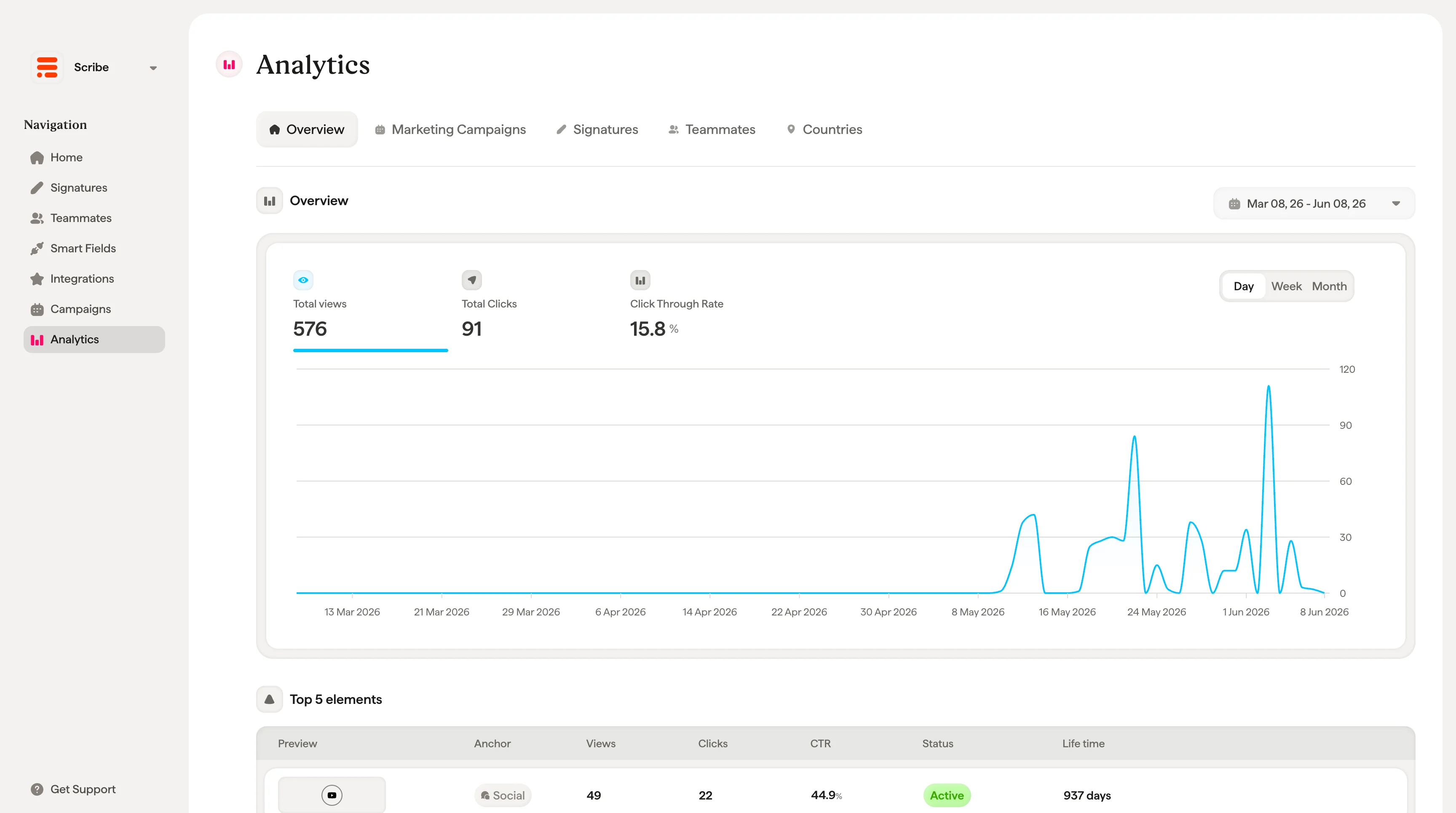
Every time a teammate sends an email with a Scribe signature, the signature elements are tracked automatically. Analytics collects four core metrics across your entire workspace:
* **Total views.** The number of times signatures were displayed to email recipients.
* **Total reach (unique users).** The number of unique recipients who saw a signature.
* **Total clicks.** The number of times recipients clicked on a signature element (link, button, banner, etc.).
* **Average CTR.** The overall click-through rate as a percentage.
These metrics are shown at the top of the Overview tab and update in real time.
Beyond views and clicks, you can also track **conversions**: the signups, demos, and purchases that happen on your website after someone clicks a signature. See [Conversion tracking](/en/conversion-tracking) to set it up with the Scribe JavaScript SDK and tie real revenue back to your signatures.
## Analytics tabs
The Analytics page is organized into five tabs, each offering a different lens on your data:
* **Overview.** A high-level summary of all signature performance with a timeline chart and leaderboards for top elements, top teammates, and top countries.
* **Marketing Campaigns.** Performance data for each [marketing campaign](/en/marketing-campaign), including views, clicks, CTR, date range, and status.
* **Signatures.** Aggregated performance per signature template, so you can compare how different signatures perform.
* **Teammates.** Individual performance per teammate, showing who is generating the most views and clicks.
* **Countries.** Geographic breakdown of signature engagement by country.
## Date range and grouping
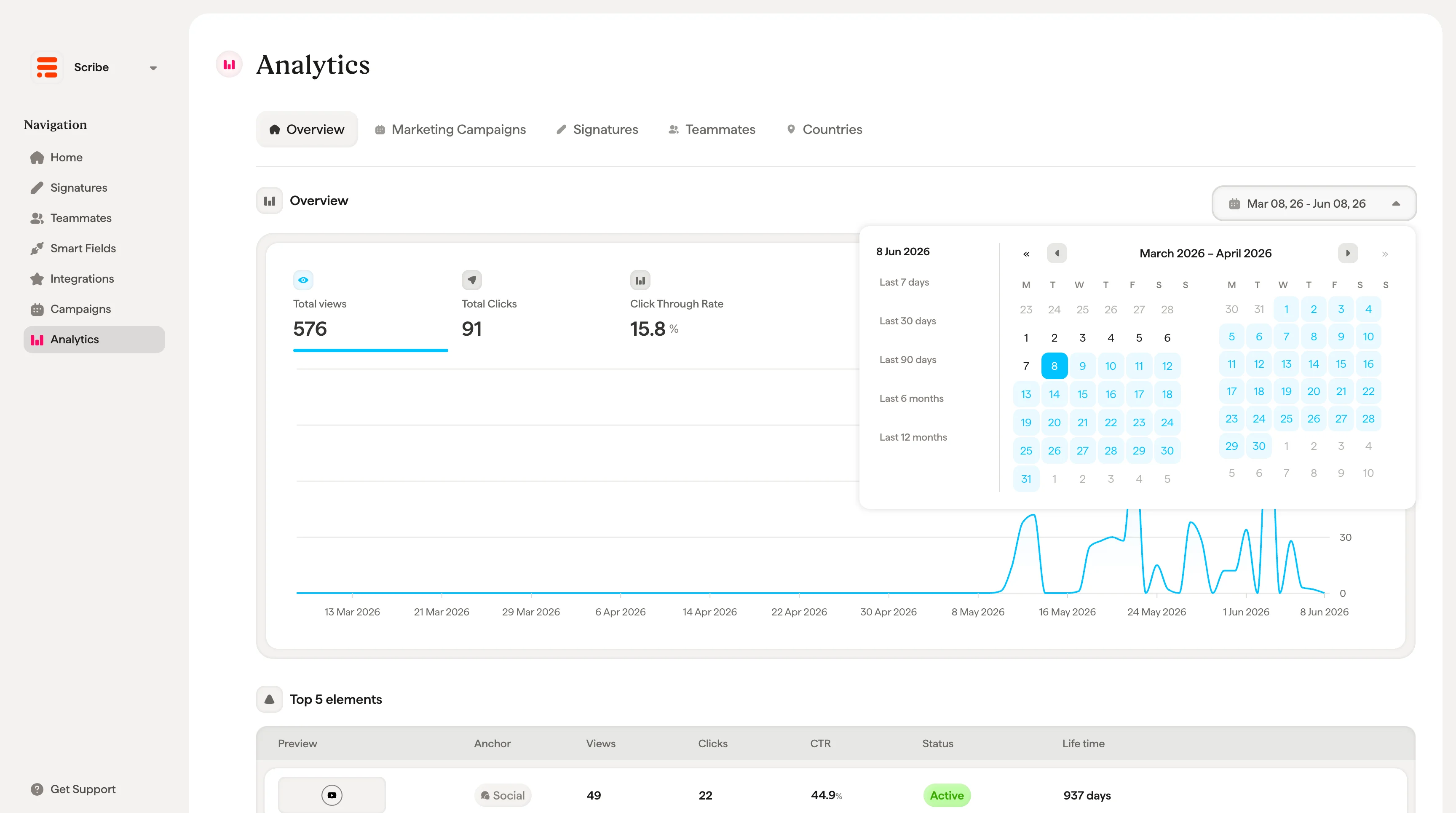
A date range picker in the top right corner lets you filter analytics to a specific period. You can also toggle the timeline chart between **Day**, **Week**, and **Month** groupings to zoom in or out on trends.
## What Analytics tracks
Every time a teammate sends an email with a Scribe signature, the signature elements are tracked automatically. Analytics collects four core metrics across your entire workspace:
* **Total views.** The number of times signatures were displayed to email recipients.
* **Total reach (unique users).** The number of unique recipients who saw a signature.
* **Total clicks.** The number of times recipients clicked on a signature element (link, button, banner, etc.).
* **Average CTR.** The overall click-through rate as a percentage.
These metrics are shown at the top of the Overview tab and update in real time.
Beyond views and clicks, you can also track **conversions**: the signups, demos, and purchases that happen on your website after someone clicks a signature. See [Conversion tracking](/en/conversion-tracking) to set it up with the Scribe JavaScript SDK and tie real revenue back to your signatures.
## Analytics tabs
The Analytics page is organized into five tabs, each offering a different lens on your data:
* **Overview.** A high-level summary of all signature performance with a timeline chart and leaderboards for top elements, top teammates, and top countries.
* **Marketing Campaigns.** Performance data for each [marketing campaign](/en/marketing-campaign), including views, clicks, CTR, date range, and status.
* **Signatures.** Aggregated performance per signature template, so you can compare how different signatures perform.
* **Teammates.** Individual performance per teammate, showing who is generating the most views and clicks.
* **Countries.** Geographic breakdown of signature engagement by country.
## Date range and grouping
A date range picker in the top right corner lets you filter analytics to a specific period. You can also toggle the timeline chart between **Day**, **Week**, and **Month** groupings to zoom in or out on trends.
 ## Top performers
The Overview tab includes three leaderboard tables that surface your best-performing items at a glance:
* **Top 5 elements.** The signature elements (links, buttons, banners) with the most engagement. Each row shows a preview, element type, link, associated signature, views, clicks, CTR, status, and lifetime.
* **Top 5 teammates.** The teammates generating the most signature engagement, with their signature, views, clicks, and CTR.
* **Top 5 countries.** The countries where recipients are engaging most, shown with a flag, views, clicks, and CTR.
## Related articles
* [Analytics dashboard](/en/analytics-dashboard): a closer look at the dashboard tabs and metrics.
* [Conversion tracking](/en/conversion-tracking): record website signups and purchases and attribute them to your signatures.
* [Signature analytics](/en/signature-analytics): performance for an individual signature.
* [Marketing campaigns](/en/marketing-overview): run and measure campaign banners across the team.
## Top performers
The Overview tab includes three leaderboard tables that surface your best-performing items at a glance:
* **Top 5 elements.** The signature elements (links, buttons, banners) with the most engagement. Each row shows a preview, element type, link, associated signature, views, clicks, CTR, status, and lifetime.
* **Top 5 teammates.** The teammates generating the most signature engagement, with their signature, views, clicks, and CTR.
* **Top 5 countries.** The countries where recipients are engaging most, shown with a flag, views, clicks, and CTR.
## Related articles
* [Analytics dashboard](/en/analytics-dashboard): a closer look at the dashboard tabs and metrics.
* [Conversion tracking](/en/conversion-tracking): record website signups and purchases and attribute them to your signatures.
* [Signature analytics](/en/signature-analytics): performance for an individual signature.
* [Marketing campaigns](/en/marketing-overview): run and measure campaign banners across the team.