> ## Documentation Index
> Fetch the complete documentation index at: https://help.scribe-mail.com/llms.txt
> Use this file to discover all available pages before exploring further.
# Add blocks
> Explore the building blocks available in the Scribe signature editor, from contact info and layout elements to images, banners, and marketing CTAs.
Click **Add Block** at the bottom of the [tree panel](/en/editor/tree-panel) to open the block library. Blocks are organized into four categories.
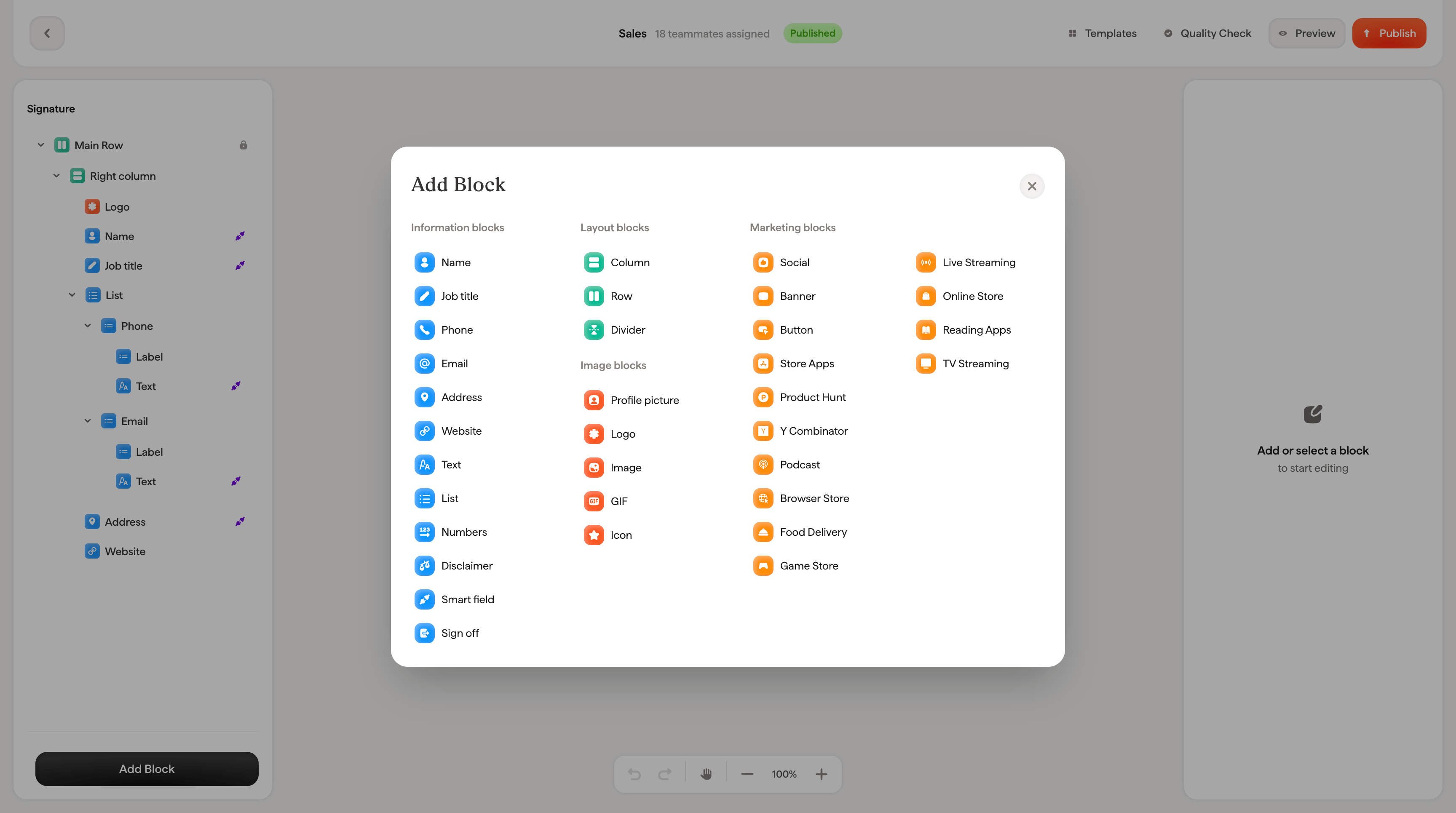 ## Information blocks
These blocks display contact and personal information, typically powered by [Smart Fields](/en/smart-fields) that pull data from your identity provider.
| Block | Description |
| --------------- | -------------------------------------------------------------------------------------------------------- |
| **Name** | Teammate's full name (syncs from First name and Last name) |
| **Job title** | Teammate's role or position |
| **Phone** | Phone number |
| **Email** | Email address |
| **Address** | Physical address |
| **Website** | Company or personal website URL |
| **Text** | Free-form text. Use for anything not covered by other blocks |
| **List** | A list of items (e.g., certifications, office locations) |
| **Numbers** | Numeric data display |
| **Disclaimer** | Legal disclaimer or confidentiality notice |
| **Smart field** | A generic block connected to any Smart Field. Use when none of the specific blocks above match your data |
| **Sign off** | A closing message (e.g., "Kind regards", "Best wishes") |
## Layout blocks
These blocks control how your signature is structured. See [building layouts with columns and rows](/en/editor/building-layouts-with-columns-and-rows) for how to combine them.
| Block | Description |
| ----------- | ------------------------------------------------------------ |
| **Column** | A vertical container that stacks blocks on top of each other |
| **Row** | A horizontal container that places blocks side by side |
| **Divider** | A horizontal line to visually separate sections |
## Image blocks
Visual elements for your signature.
| Block | Description |
| ------------------- | ------------------------------------------------------- |
| **Profile picture** | Teammate's photo (can sync from your identity provider) |
| **Logo** | Company logo image |
| **Image** | Any custom image |
| **GIF** | An animated GIF |
| **Icon** | A small icon element |
## Marketing blocks
Interactive elements that drive engagement and link to external platforms.
| Block | Description |
| ------------------ | ----------------------------------------------------------------- |
| **Social** | Social media icons (LinkedIn, Twitter, Facebook, Instagram, etc.) |
| **Banner** | A campaign banner image with a clickable link |
| **Button** | A call-to-action button with custom text and link |
| **Store Apps** | App Store and Google Play download badges |
| **Product Hunt** | Product Hunt badge |
| **Y Combinator** | Y Combinator badge |
| **Podcast** | Links to podcast platforms (Apple, Spotify, etc.) |
| **Browser Store** | Chrome Web Store or other browser extension links |
| **Food Delivery** | Food delivery platform badges (Uber Eats, DoorDash, etc.) |
| **Game Store** | Gaming platform badges (Steam, Epic, etc.) |
| **Live Streaming** | Streaming platform links (Twitch, YouTube Live, etc.) |
| **Online Store** | E-commerce platform badges (Shopify, Etsy, etc.) |
| **Reading Apps** | Reading platform badges (Kindle, Audible, etc.) |
| **TV Streaming** | TV streaming badges (Netflix, Disney+, etc.) |
Start with the information blocks to build your core signature, use layout blocks to arrange them visually, then add marketing blocks for engagement. You can always rearrange, hide, or remove blocks later.
## Related articles
* [Text blocks](/en/editor/text-blocks)
* [Image blocks](/en/editor/image-blocks)
* [Button blocks](/en/editor/button-blocks)
* [Social icons](/en/editor/social-icons)
## Information blocks
These blocks display contact and personal information, typically powered by [Smart Fields](/en/smart-fields) that pull data from your identity provider.
| Block | Description |
| --------------- | -------------------------------------------------------------------------------------------------------- |
| **Name** | Teammate's full name (syncs from First name and Last name) |
| **Job title** | Teammate's role or position |
| **Phone** | Phone number |
| **Email** | Email address |
| **Address** | Physical address |
| **Website** | Company or personal website URL |
| **Text** | Free-form text. Use for anything not covered by other blocks |
| **List** | A list of items (e.g., certifications, office locations) |
| **Numbers** | Numeric data display |
| **Disclaimer** | Legal disclaimer or confidentiality notice |
| **Smart field** | A generic block connected to any Smart Field. Use when none of the specific blocks above match your data |
| **Sign off** | A closing message (e.g., "Kind regards", "Best wishes") |
## Layout blocks
These blocks control how your signature is structured. See [building layouts with columns and rows](/en/editor/building-layouts-with-columns-and-rows) for how to combine them.
| Block | Description |
| ----------- | ------------------------------------------------------------ |
| **Column** | A vertical container that stacks blocks on top of each other |
| **Row** | A horizontal container that places blocks side by side |
| **Divider** | A horizontal line to visually separate sections |
## Image blocks
Visual elements for your signature.
| Block | Description |
| ------------------- | ------------------------------------------------------- |
| **Profile picture** | Teammate's photo (can sync from your identity provider) |
| **Logo** | Company logo image |
| **Image** | Any custom image |
| **GIF** | An animated GIF |
| **Icon** | A small icon element |
## Marketing blocks
Interactive elements that drive engagement and link to external platforms.
| Block | Description |
| ------------------ | ----------------------------------------------------------------- |
| **Social** | Social media icons (LinkedIn, Twitter, Facebook, Instagram, etc.) |
| **Banner** | A campaign banner image with a clickable link |
| **Button** | A call-to-action button with custom text and link |
| **Store Apps** | App Store and Google Play download badges |
| **Product Hunt** | Product Hunt badge |
| **Y Combinator** | Y Combinator badge |
| **Podcast** | Links to podcast platforms (Apple, Spotify, etc.) |
| **Browser Store** | Chrome Web Store or other browser extension links |
| **Food Delivery** | Food delivery platform badges (Uber Eats, DoorDash, etc.) |
| **Game Store** | Gaming platform badges (Steam, Epic, etc.) |
| **Live Streaming** | Streaming platform links (Twitch, YouTube Live, etc.) |
| **Online Store** | E-commerce platform badges (Shopify, Etsy, etc.) |
| **Reading Apps** | Reading platform badges (Kindle, Audible, etc.) |
| **TV Streaming** | TV streaming badges (Netflix, Disney+, etc.) |
Start with the information blocks to build your core signature, use layout blocks to arrange them visually, then add marketing blocks for engagement. You can always rearrange, hide, or remove blocks later.
## Related articles
* [Text blocks](/en/editor/text-blocks)
* [Image blocks](/en/editor/image-blocks)
* [Button blocks](/en/editor/button-blocks)
* [Social icons](/en/editor/social-icons)