> ## Documentation Index
> Fetch the complete documentation index at: https://help.scribe-mail.com/llms.txt
> Use this file to discover all available pages before exploring further.

# BambooHR

> HRシステムであるBambooHRから氏名・役職・カスタムフィールドなどの従業員情報を同期し、メール署名を常に正確かつ最新の状態に保ちます。

BambooHRをデータソースとして[チームメンバーの署名を自動入力](/ja/smart-fields)する手順は以下のとおりです。

<Info>
  **チームメンバー側での操作は不要です。**
</Info>

<Info>
  **BambooHRでの変更はScribeに自動同期されます。**
</Info>

<Info>
  **SOC 2 Type II 認証取得済み。** [データは安全に保護されます](/ja/security/data-collection/bamboohr)。
</Info>

## インストールガイド

### 前提条件

* 管理者権限のあるScribeアカウント
* APIキーにアクセスできるBambooHRアカウント

<Steps>
  <Step title="BambooHRアカウントを開き、URLバーからインスタンスのサブドメインをコピー">
    サブドメインは、BambooHRのURLで`.bamboohr.com`の前の部分です。Scribeの**サブドメイン**欄に入力してください。

    <Frame>
      <img src="https://mintcdn.com/scribe/I5V9iTucPI_EY3nq/integrations/smart-fields/images/bamboohr-step-1.png?fit=max&auto=format&n=I5V9iTucPI_EY3nq&q=85&s=f9fb00e815331693135a27776c1b62b1" alt="URLバー内のBambooHRサブドメイン" className="mx-auto" style={{ width:"80%" }} width="922" height="152" data-path="integrations/smart-fields/images/bamboohr-step-1.png" />
    </Frame>
  </Step>

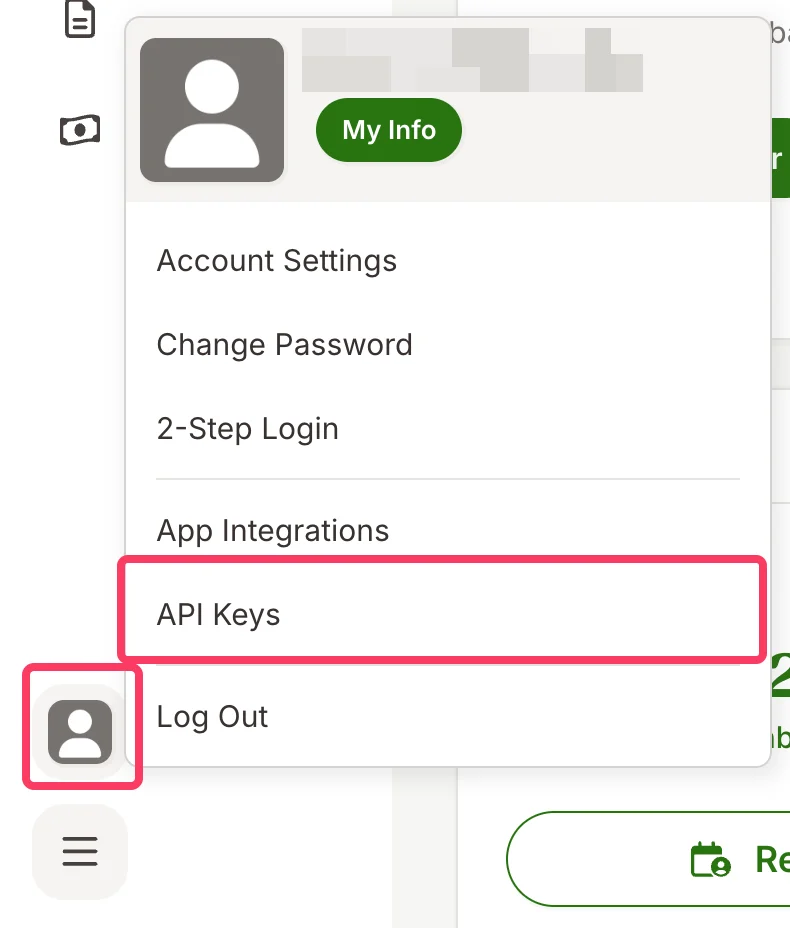
  <Step title="BambooHRアカウントでプロフィール画像をクリックし、API Keysをクリック">
    <Frame>
      <img src="https://mintcdn.com/scribe/I5V9iTucPI_EY3nq/integrations/smart-fields/images/bamboohr-step-2.png?fit=max&auto=format&n=I5V9iTucPI_EY3nq&q=85&s=3b3ea5b147a464b14057732c520e3661" alt="API KeysオプションのあるBambooHRプロフィールメニュー" className="mx-auto" style={{ width:"51%" }} width="790" height="928" data-path="integrations/smart-fields/images/bamboohr-step-2.png" />
    </Frame>
  </Step>

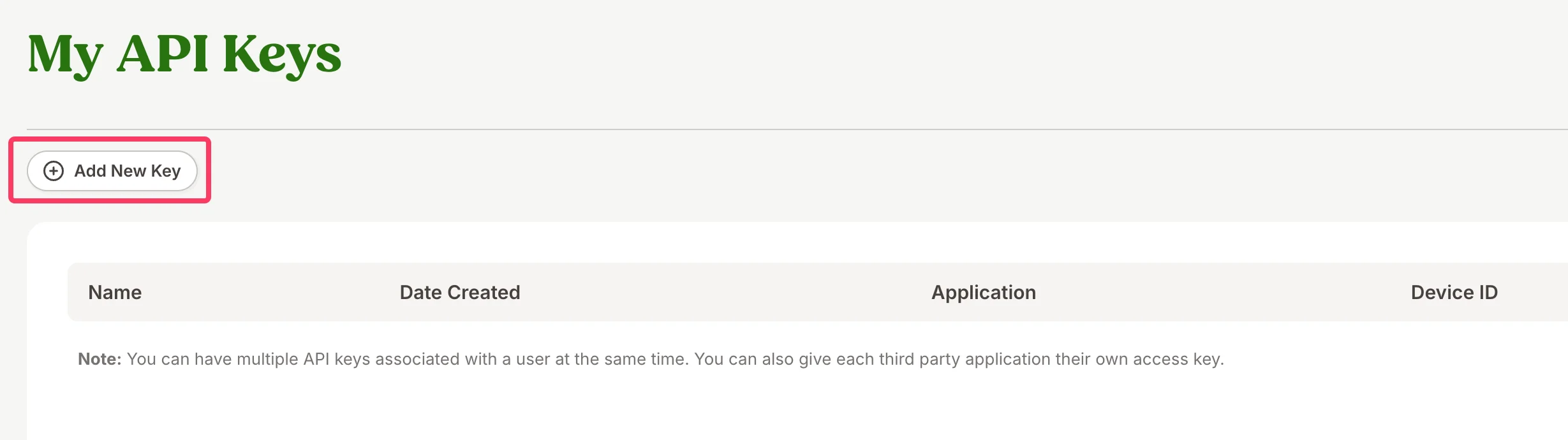
  <Step title="Add New Keyをクリック">
    <Frame>
      <img src="https://mintcdn.com/scribe/I5V9iTucPI_EY3nq/integrations/smart-fields/images/bamboohr-step-3.png?fit=max&auto=format&n=I5V9iTucPI_EY3nq&q=85&s=9ea6c76c8dc61421505fe3e64944ecf9" alt="Add New KeyボタンのあるMy API Keysページ" className="mx-auto" style={{ width:"76%" }} width="2458" height="690" data-path="integrations/smart-fields/images/bamboohr-step-3.png" />
    </Frame>
  </Step>

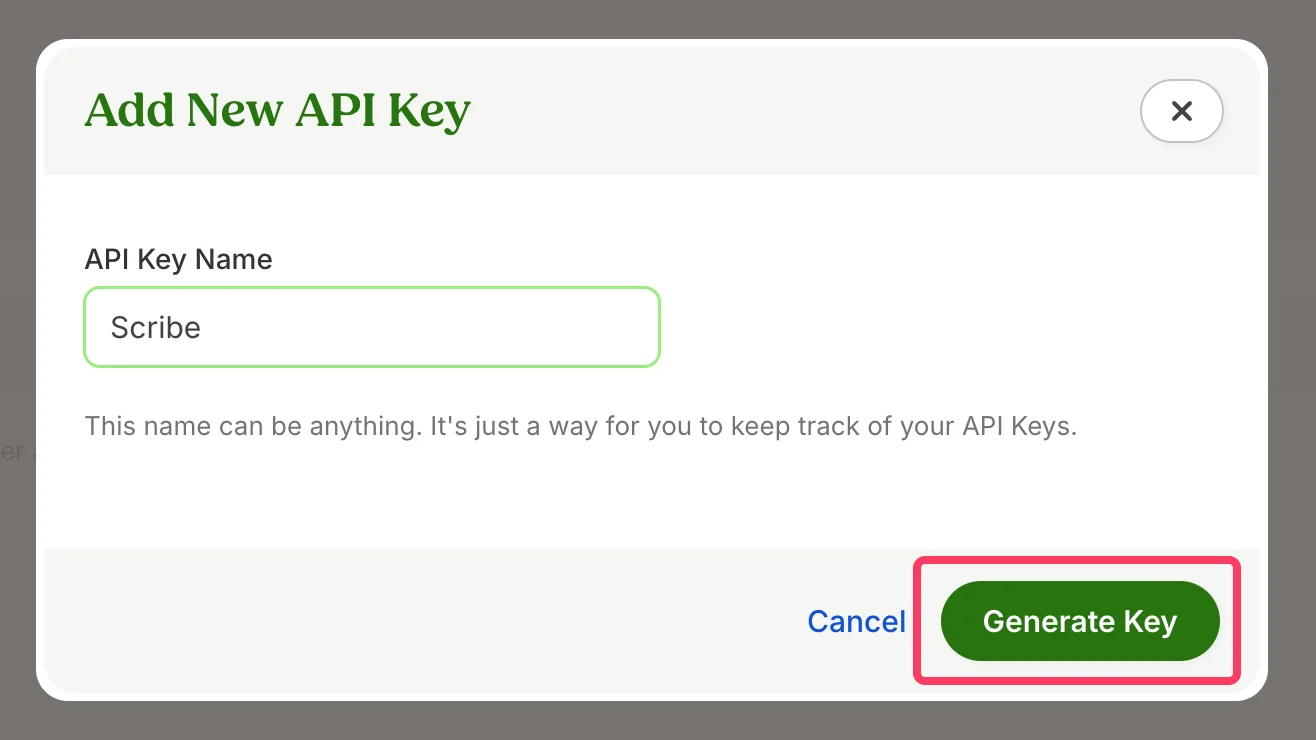
  <Step title="APIキーの名前を入力し、Generate Keyをクリック">
    キー名は任意です(例:"Scribe")。APIキーを管理しやすくするためのものです。
    <Frame>
      <img src="https://mintcdn.com/scribe/I5V9iTucPI_EY3nq/integrations/smart-fields/images/bamboohr-step-4.png?fit=max&auto=format&n=I5V9iTucPI_EY3nq&q=85&s=20524dcc449b4c6c0d9b5a145f671a3d" alt="名前欄とGenerate KeyボタンのあるAdd New API Keyダイアログ" className="mx-auto" style={{ width:"71%" }} width="1316" height="740" data-path="integrations/smart-fields/images/bamboohr-step-4.png" />
    </Frame>
  </Step>

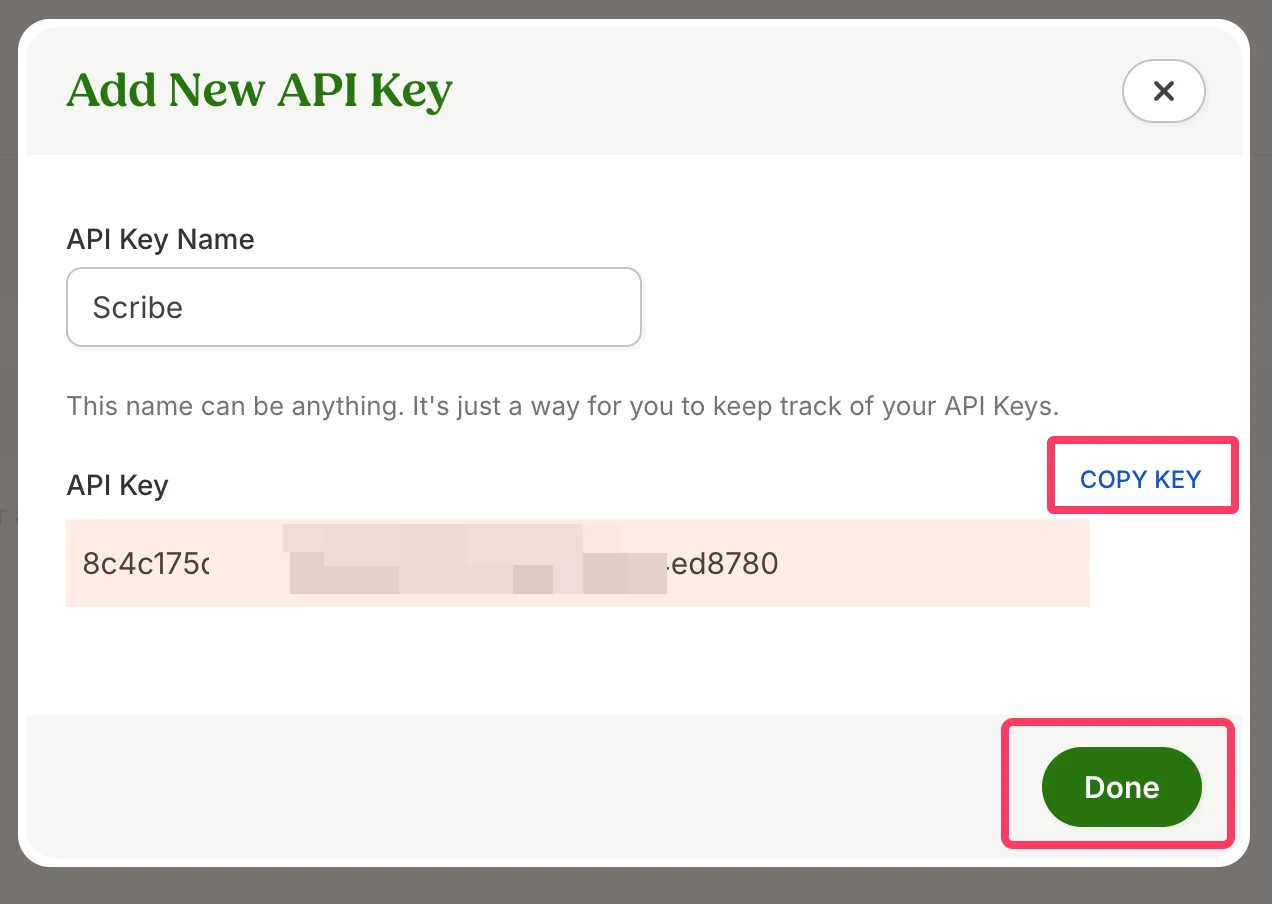
  <Step title="生成されたAPIキーをコピーし、ScribeのBambooHR APIキー欄に貼り付けて、&#x22;Done&#x22;をクリック">
    <Frame>
      <img src="https://mintcdn.com/scribe/I5V9iTucPI_EY3nq/integrations/smart-fields/images/bamboohr-step-5.png?fit=max&auto=format&n=I5V9iTucPI_EY3nq&q=85&s=0ab4f978b68d727c64e854164b4d0c20" alt="Copy KeyボタンとDoneボタンが表示された生成済みAPIキー" className="mx-auto" style={{ width:"75%" }} width="1272" height="904" data-path="integrations/smart-fields/images/bamboohr-step-5.png" />
    </Frame>
  </Step>

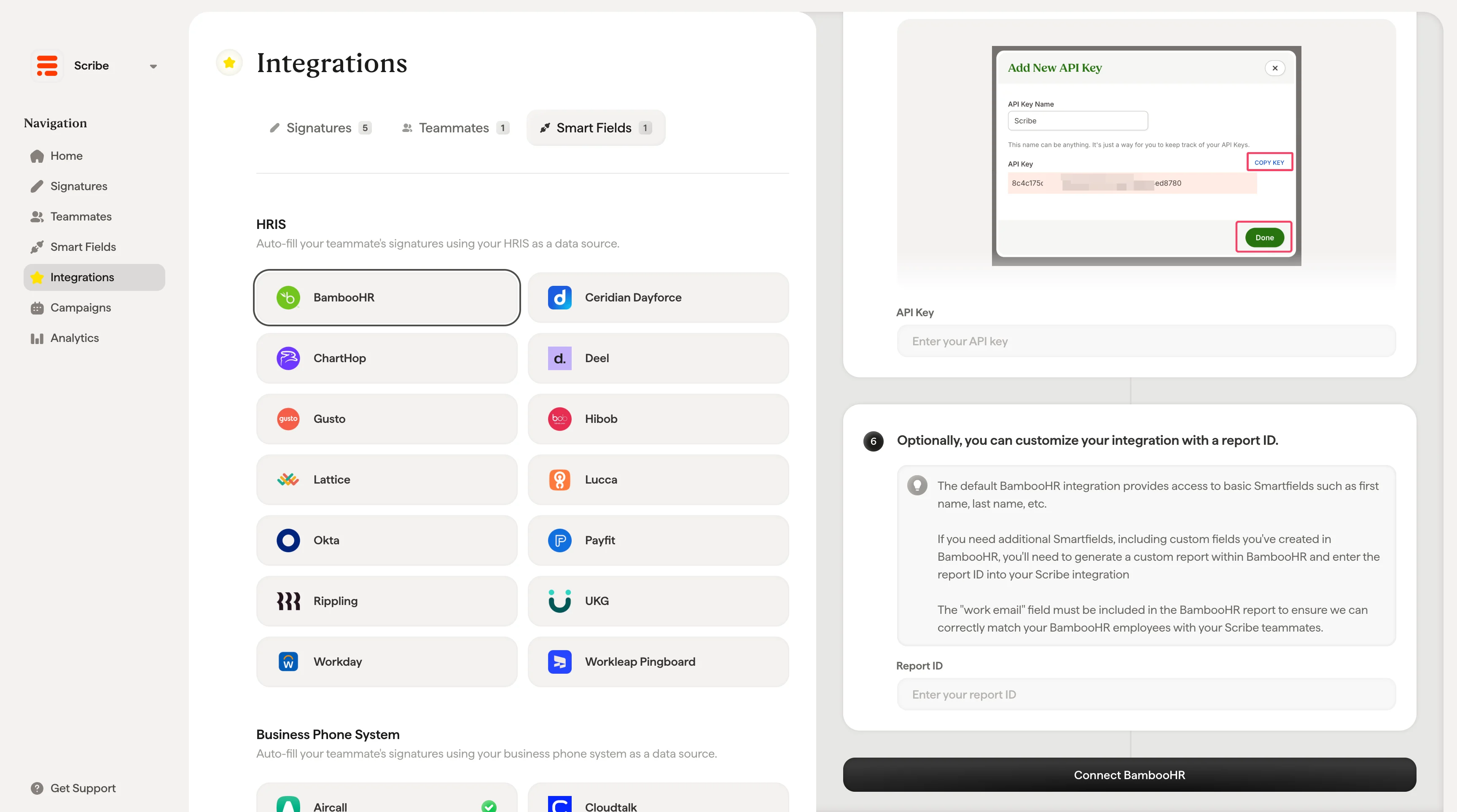
  <Step title="任意で、レポートIDを使って連携をカスタマイズできます。">
    デフォルトのBambooHR連携では、姓・名などの基本的なSmartfieldsを利用できます。

    BambooHRで作成したカスタムフィールドを含む追加のSmartfieldsが必要な場合は、BambooHR内でカスタムレポートを生成し、そのレポートIDをScribe連携に入力する必要があります。

    <Warning>
      BambooHRの従業員とScribeのチームメンバーを正しく照合するため、BambooHRレポートには「work email」フィールドを必ず含めてください。
    </Warning>

    レポートIDを入力し、**Connect BambooHR** をクリックしてください。
    <Frame>
      <img src="https://mintcdn.com/scribe/Z_G2D9X-Tlrxu_Eh/images/bamboohr-connect-integration-report-id.png?fit=max&auto=format&n=Z_G2D9X-Tlrxu_Eh&q=85&s=93c479407091642dfd7ced1de0c49b83" alt="ScribeのBambooHRレポートID入力欄とConnect BambooHRボタン" width="3456" height="1926" data-path="images/bamboohr-connect-integration-report-id.png" />
    </Frame>
  </Step>
</Steps>

## 関連記事

* [Ceridian Dayforce](/ja/integrations/smart-fields/ceridian-dayforce-smart-fields):Ceridian Dayforceのデータを署名に同期します。
* [ChartHop](/ja/integrations/smart-fields/charthop-smart-fields):ChartHopのデータを署名に同期します。
* [チームメンバーを署名に割り当てる](/ja/assign-teammates-to-a-signature):Smartfieldの条件を使って署名を自動的に割り当てます。