> ## Documentation Index
> Fetch the complete documentation index at: https://help.scribe-mail.com/llms.txt
> Use this file to discover all available pages before exploring further.
# Zoho Mail
> Zoho Mail 관리자 권한으로 팀 전체의 Zoho Mail에 Scribe 이메일 서명을 원클릭으로 설치할 수 있어요. 팀원이 따로 할 일은 없어요. 모든 요금제에서 무료로 제공돼요.
**중앙 집중식 원클릭 설치.** 팀원이 따로 할 일은 없어요. 사용자는 메일 작성 시 서명을 볼 수 있어요. 클라우드 기반 설치: 메일은 Scribe 서버를 거치지 않아요.
**지원 플랫폼:** 웹용 Zoho Mail
## 작동 방식
Scribe는 각 팀원의 서명을 관리자가 추가한 서명으로 Zoho Mail에 기록해요. 이후 Zoho Mail이 자동으로 서명을 삽입해요:
* 새 메일, 답장, 전달 메일의 인용문 위에 삽입돼요.
* 설치된 각 주소에 적용돼요: 팀원의 기본 주소, 그리고 [별칭을 가져온 경우](/ko/integrations/teammates/zoho-mail-teammates) 각 별칭에 고유한 서명이 적용돼요.
팀원은 서명을 편집할 수 없어요. Zoho Mail은 해당 서명을 관리자가 생성한 것으로 표시해요. Scribe에서 변경 사항을 게시하거나 팀원 정보가 바뀌면, Scribe가 Zoho Mail의 동일한 서명을 업데이트해요.
팀원에게 두 개 이상의 서명이 할당된 경우, Scribe는 각각을 모두 Zoho Mail에 설치해요. Zoho Mail은 새 메일에 주소당 하나의 서명을 추가하는데, 우선순위가 가장 높은 서명이 사용돼요([서명 우선순위](/ko/signature-priority) 참고). 나머지는 주소에 할당되지 않은 상태로 팀원의 Zoho Mail 서명 목록에 추가돼요.
Zoho Mail은 Zoho Mail 안에서만 서명을 추가해요. Apple Mail이나 Outlook처럼 IMAP 또는 SMTP로 Zoho Mail에 연결된 다른 앱에서 보낸 메일에는 서명이 포함되지 않아요. 이러한 앱에는 [수동 설치](/ko/integrations-overview#manual)를 사용하세요.
Zoho Mail 서명은 모든 요금제에서 무료로 제공돼요.
## 설치 가이드
### 사전 준비 사항
* 관리자 권한이 있는 Scribe 계정
* **슈퍼 관리자** 또는 **관리자** 계정이 있는 Zoho Mail 조직
이 연동을 설치하려면 **Zoho Mail의 슈퍼 관리자 또는 관리자**여야 해요.
Scribe에서 Integrations로 이동한 뒤, Signatures 아래 **Zoho Mail**을 열고 **Connect Zoho Mail**을 클릭하세요.
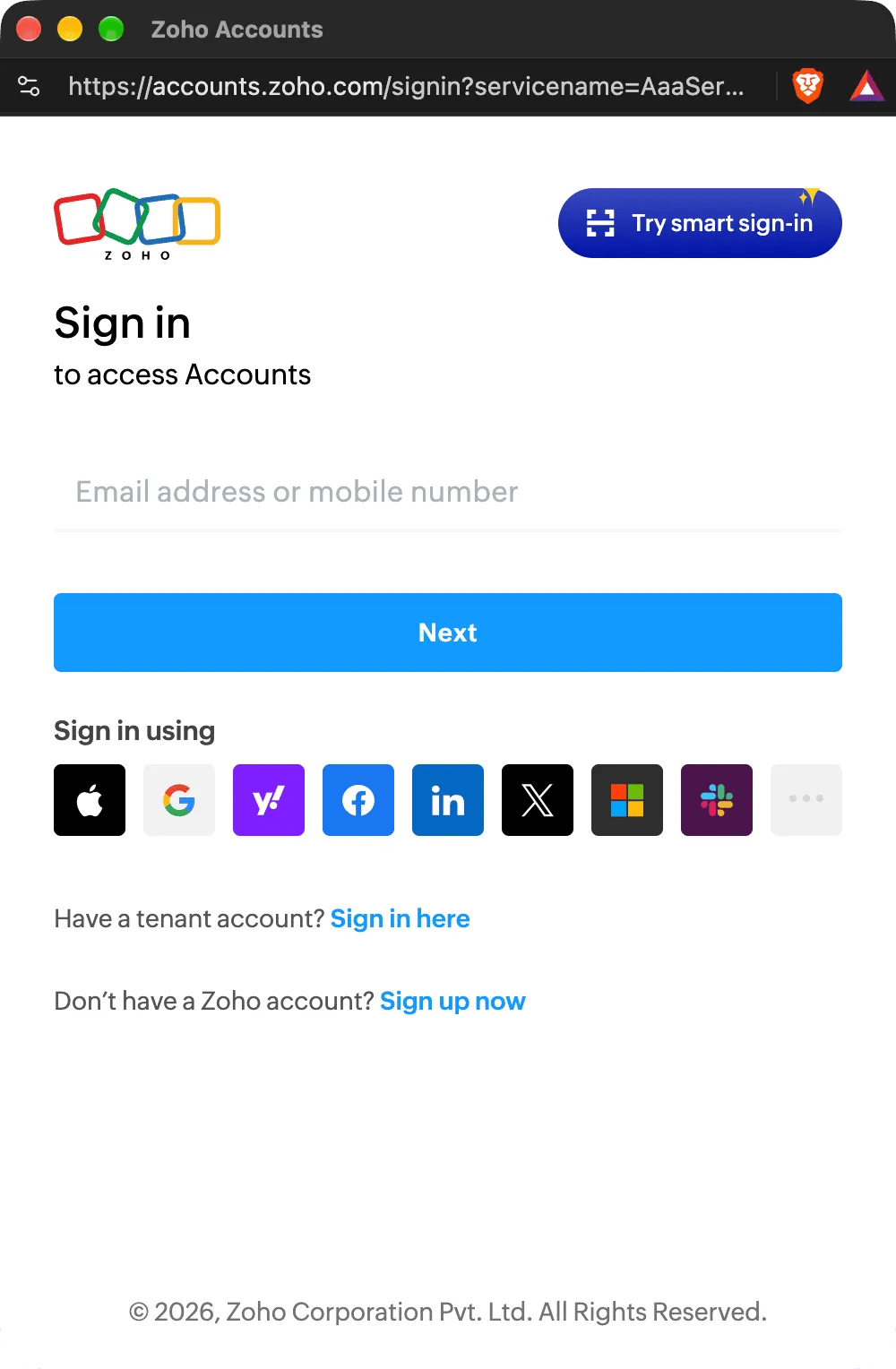
이미 Zoho에 로그인되어 있다면 이 단계는 건너뜁니다.
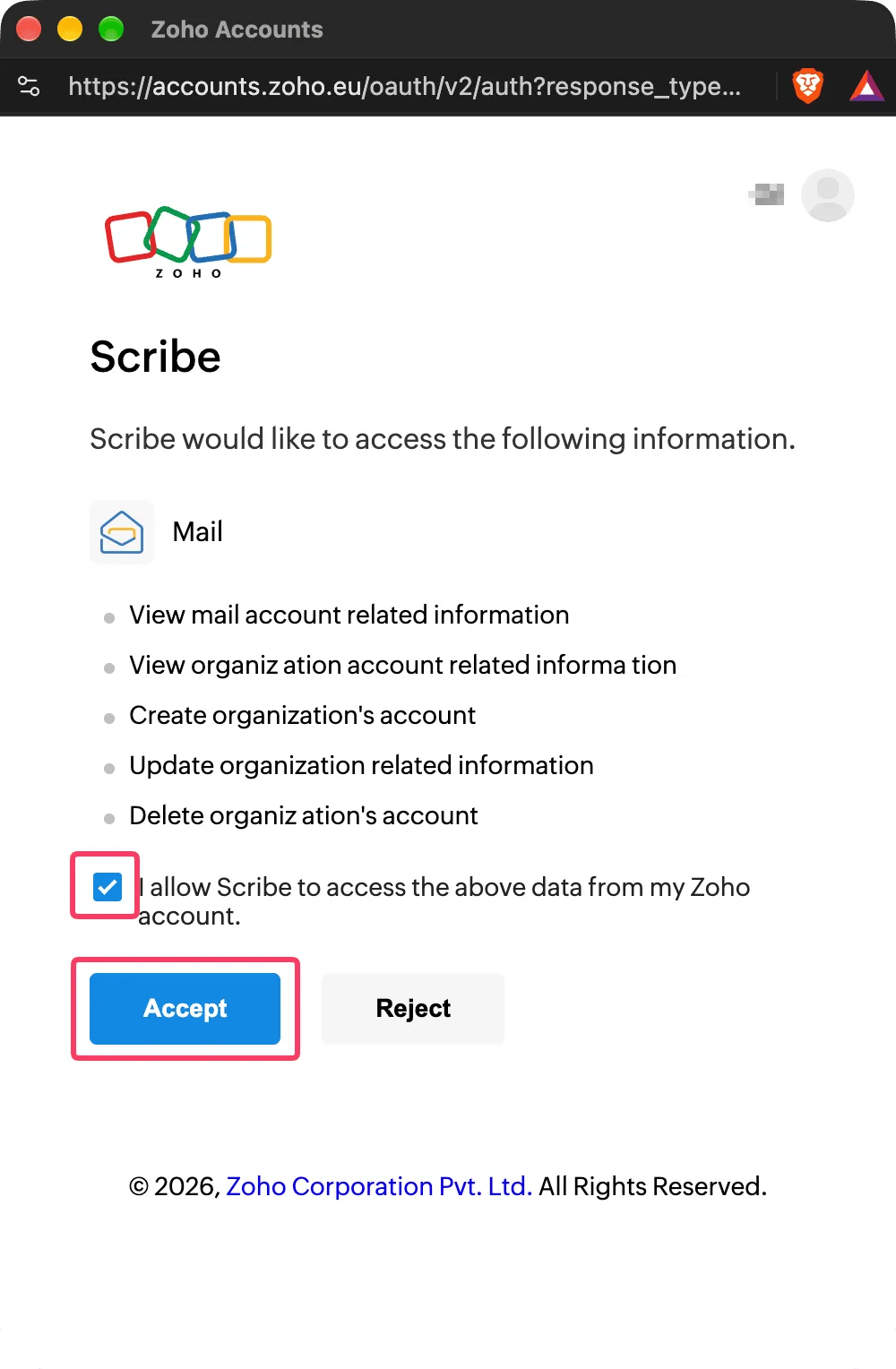
 Zoho에는 서명만을 위한 권한이 따로 없기 때문에, 조직의 사용자 계정을 Scribe가 관리할 수 있도록 허용해 달라고 요청해요. Scribe는 팀원의 이메일 서명을 추가·업데이트·삭제하는 작업만 수행합니다. Scribe가 Zoho Mail API에서 사용하는 범위는 [여기](/ko/security/scopes-used-from-zoho-mail)에서 확인할 수 있어요.
**I allow Scribe to access the above data from my Zoho account**를 체크한 다음 **Accept**를 클릭하세요. 연동이 자동으로 완료돼요.
Zoho에는 서명만을 위한 권한이 따로 없기 때문에, 조직의 사용자 계정을 Scribe가 관리할 수 있도록 허용해 달라고 요청해요. Scribe는 팀원의 이메일 서명을 추가·업데이트·삭제하는 작업만 수행합니다. Scribe가 Zoho Mail API에서 사용하는 범위는 [여기](/ko/security/scopes-used-from-zoho-mail)에서 확인할 수 있어요.
**I allow Scribe to access the above data from my Zoho account**를 체크한 다음 **Accept**를 클릭하세요. 연동이 자동으로 완료돼요.
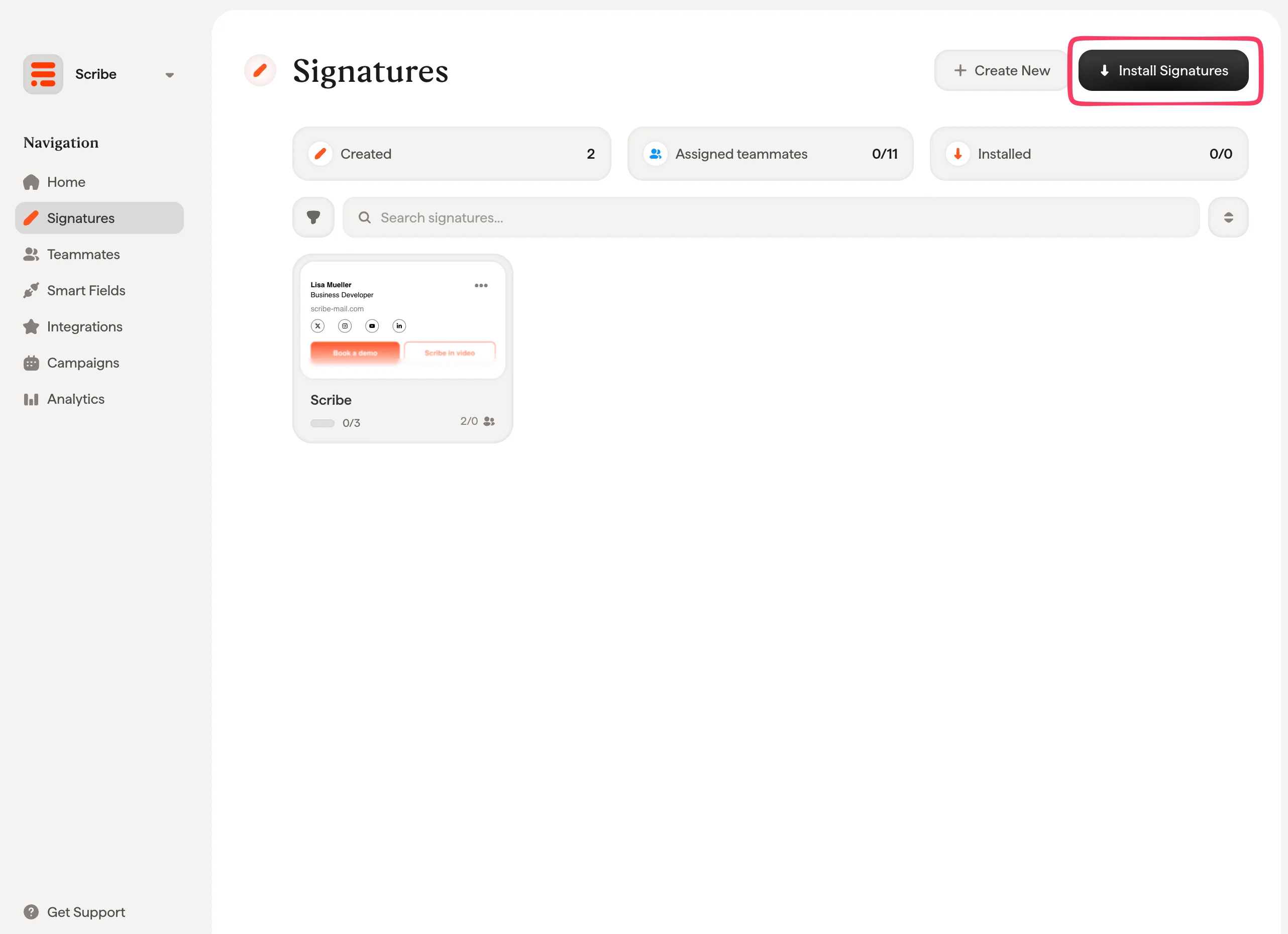
 서명 목록에서 [팀원에게 모든 서명을 한 번에 설치](/ko/install-signatures)하거나, 점진적으로 적용하기 위해 하나씩 설치할 수 있어요. Zoho Mail은 각 서명을 즉시 설치하므로 대기 시간이 없습니다.
 Scribe는 중국(zoho.com.cn)을 제외한 모든 Zoho 데이터 센터의 Zoho 계정을 지원해요. 하나의 Zoho Mail 조직은 하나의 Scribe 워크스페이스에만 연결할 수 있습니다.
## 문제 해결
설치가 실패하면 Scribe에서 팀원의 상태에 이유가 표시돼요. 각 이유에 대한 전용 페이지가 있어요:
* [Zoho Mail에 비해 서명이 너무 김](/ko/troubleshooting/zoho-mail-signature-too-long): Zoho Mail이 크기 때문에 서명을 거부했어요.
* [Zoho Mail 액세스 손실](/ko/troubleshooting/zoho-mail-access-lost): Scribe가 더 이상 Zoho Mail 조직에 서명을 쓸 수 없어요.
* [Zoho Mail 서명이 설치되지 않음](/ko/troubleshooting/zoho-mail-signature-not-installed): 팀원의 주소에 Zoho Mail 조직 내 활성 메일박스가 없어요.
연결에 실패하면 Scribe가 다음 메시지 중 하나를 표시해요:
| 메시지 | 조치 방법 |
| - | - |
| You need to be an admin of your Zoho Mail organization to activate this integration. | **Super Admin** 또는 **Admin** 계정으로 Zoho에 로그인하거나, Scribe 워크스페이스에 관리자를 초대해 연결하세요. |
| This Zoho Mail organization is already linked to another Scribe workspace. | 다른 워크스페이스에서 Zoho Mail 연결을 먼저 해제하거나, 해당 워크스페이스에서 연결하세요. |
| Scribe does not support the Zoho data center of your account. | Zoho 계정이 중국에서 호스팅되고 있으며, Scribe는 이를 지원하지 않아요. |
| There is an issue with your credentials. Please try again. | **Connect Zoho Mail**에서 다시 시작하고 모든 범위를 수락하세요. |
| Zoho Mail is not responding. Please try again in a few minutes. | Zoho가 응답하지 않았어요. 몇 분 후 다시 시도하세요. |
## 관련 문서
* [연동 개요](/ko/integrations-overview): 클라우드 또는 서버 측에서 Scribe 서명을 배포하는 모든 방법.
* [Zoho Mail 팀원](/ko/integrations/teammates/zoho-mail-teammates): Zoho Mail 사용자와 그룹을 Scribe와 동기화.
* [설치 상태 및 오류](/ko/signature-installation-statuses-and-errors): 각 설치 상태의 의미와 오류 해결 방법.
This documentation is built and hosted on [Mintlify](https://mintlify.com), a developer documentation platform.
Scribe는 중국(zoho.com.cn)을 제외한 모든 Zoho 데이터 센터의 Zoho 계정을 지원해요. 하나의 Zoho Mail 조직은 하나의 Scribe 워크스페이스에만 연결할 수 있습니다.
## 문제 해결
설치가 실패하면 Scribe에서 팀원의 상태에 이유가 표시돼요. 각 이유에 대한 전용 페이지가 있어요:
* [Zoho Mail에 비해 서명이 너무 김](/ko/troubleshooting/zoho-mail-signature-too-long): Zoho Mail이 크기 때문에 서명을 거부했어요.
* [Zoho Mail 액세스 손실](/ko/troubleshooting/zoho-mail-access-lost): Scribe가 더 이상 Zoho Mail 조직에 서명을 쓸 수 없어요.
* [Zoho Mail 서명이 설치되지 않음](/ko/troubleshooting/zoho-mail-signature-not-installed): 팀원의 주소에 Zoho Mail 조직 내 활성 메일박스가 없어요.
연결에 실패하면 Scribe가 다음 메시지 중 하나를 표시해요:
| 메시지 | 조치 방법 |
| - | - |
| You need to be an admin of your Zoho Mail organization to activate this integration. | **Super Admin** 또는 **Admin** 계정으로 Zoho에 로그인하거나, Scribe 워크스페이스에 관리자를 초대해 연결하세요. |
| This Zoho Mail organization is already linked to another Scribe workspace. | 다른 워크스페이스에서 Zoho Mail 연결을 먼저 해제하거나, 해당 워크스페이스에서 연결하세요. |
| Scribe does not support the Zoho data center of your account. | Zoho 계정이 중국에서 호스팅되고 있으며, Scribe는 이를 지원하지 않아요. |
| There is an issue with your credentials. Please try again. | **Connect Zoho Mail**에서 다시 시작하고 모든 범위를 수락하세요. |
| Zoho Mail is not responding. Please try again in a few minutes. | Zoho가 응답하지 않았어요. 몇 분 후 다시 시도하세요. |
## 관련 문서
* [연동 개요](/ko/integrations-overview): 클라우드 또는 서버 측에서 Scribe 서명을 배포하는 모든 방법.
* [Zoho Mail 팀원](/ko/integrations/teammates/zoho-mail-teammates): Zoho Mail 사용자와 그룹을 Scribe와 동기화.
* [설치 상태 및 오류](/ko/signature-installation-statuses-and-errors): 각 설치 상태의 의미와 오류 해결 방법.
This documentation is built and hosted on [Mintlify](https://mintlify.com), a developer documentation platform.