> ## Documentation Index
> Fetch the complete documentation index at: https://help.scribe-mail.com/llms.txt
> Use this file to discover all available pages before exploring further.

# BambooHR

> 이름, 직책, 커스텀 필드 같은 직원 정보를 HR 시스템인 BambooHR에서 동기화해 이메일 서명을 정확하고 자동으로 최신 상태로 유지하세요.

BambooHR를 데이터 소스로 사용해 [팀원의 서명을 자동 입력](/ko/smart-fields)하려면 다음 단계를 따르세요.

<Info>
  **팀원이 따로 할 일은 없어요.**
</Info>

<Info>
  **BambooHR의 변경 사항은 Scribe에 자동으로 동기화돼요.**
</Info>

<Info>
  **SOC 2 Type II 인증.** [데이터는 안전하게 보호돼요](/ko/security/data-collection/bamboohr).
</Info>

## 설치 가이드

### 사전 준비

* 관리자 권한이 있는 Scribe 계정
* API 키에 접근할 수 있는 BambooHR 계정

<Steps>
  <Step title="BambooHR 계정으로 이동해 URL 표시줄에서 인스턴스 하위 도메인을 복사하세요">
    하위 도메인은 BambooHR URL에서 `.bamboohr.com` 앞부분이에요. Scribe의 **Subdomain** 필드에 입력하세요.

    <Frame>
      <img src="https://mintcdn.com/scribe/I5V9iTucPI_EY3nq/integrations/smart-fields/images/bamboohr-step-1.png?fit=max&auto=format&n=I5V9iTucPI_EY3nq&q=85&s=f9fb00e815331693135a27776c1b62b1" alt="URL 표시줄의 BambooHR 하위 도메인" className="mx-auto" style={{ width:"80%" }} width="922" height="152" data-path="integrations/smart-fields/images/bamboohr-step-1.png" />
    </Frame>
  </Step>

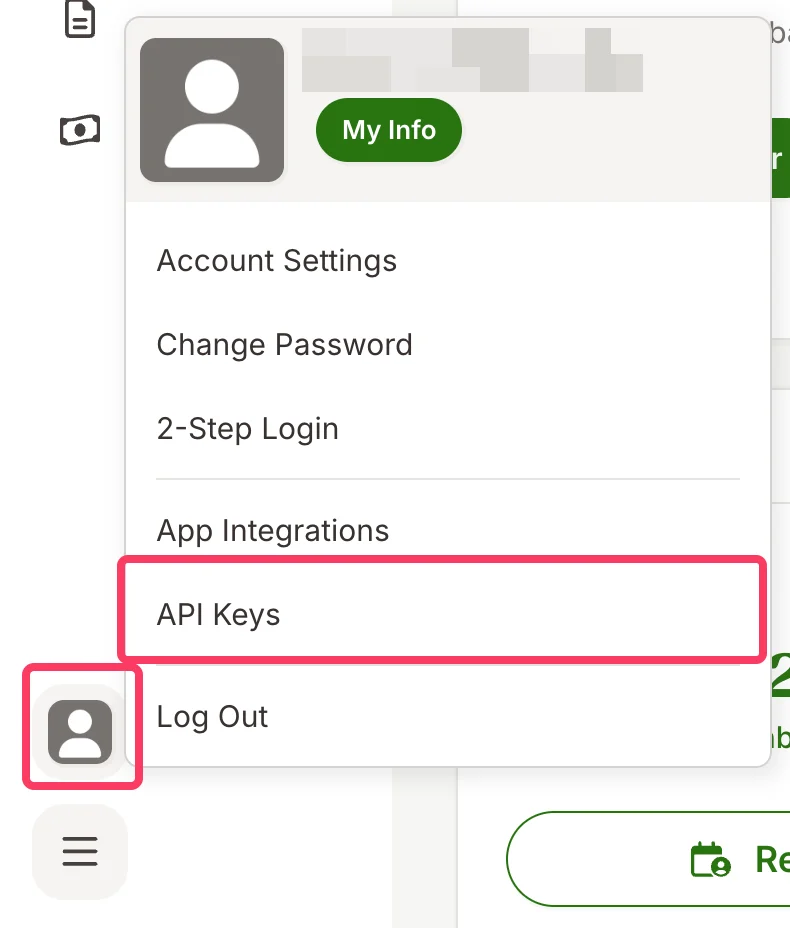
  <Step title="BambooHR 계정에서 프로필 사진을 클릭한 다음 API Keys를 클릭하세요">
    <Frame>
      <img src="https://mintcdn.com/scribe/I5V9iTucPI_EY3nq/integrations/smart-fields/images/bamboohr-step-2.png?fit=max&auto=format&n=I5V9iTucPI_EY3nq&q=85&s=3b3ea5b147a464b14057732c520e3661" alt="API Keys 옵션이 있는 BambooHR 프로필 메뉴" className="mx-auto" style={{ width:"51%" }} width="790" height="928" data-path="integrations/smart-fields/images/bamboohr-step-2.png" />
    </Frame>
  </Step>

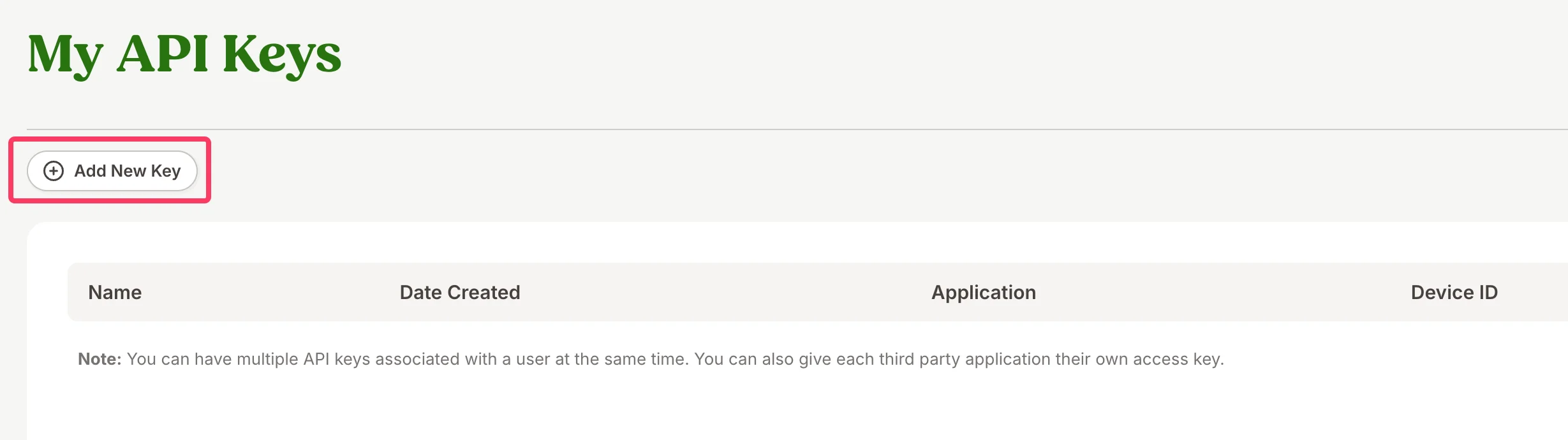
  <Step title="Add New Key를 클릭하세요">
    <Frame>
      <img src="https://mintcdn.com/scribe/I5V9iTucPI_EY3nq/integrations/smart-fields/images/bamboohr-step-3.png?fit=max&auto=format&n=I5V9iTucPI_EY3nq&q=85&s=9ea6c76c8dc61421505fe3e64944ecf9" alt="Add New Key 버튼이 있는 My API Keys 페이지" className="mx-auto" style={{ width:"76%" }} width="2458" height="690" data-path="integrations/smart-fields/images/bamboohr-step-3.png" />
    </Frame>
  </Step>

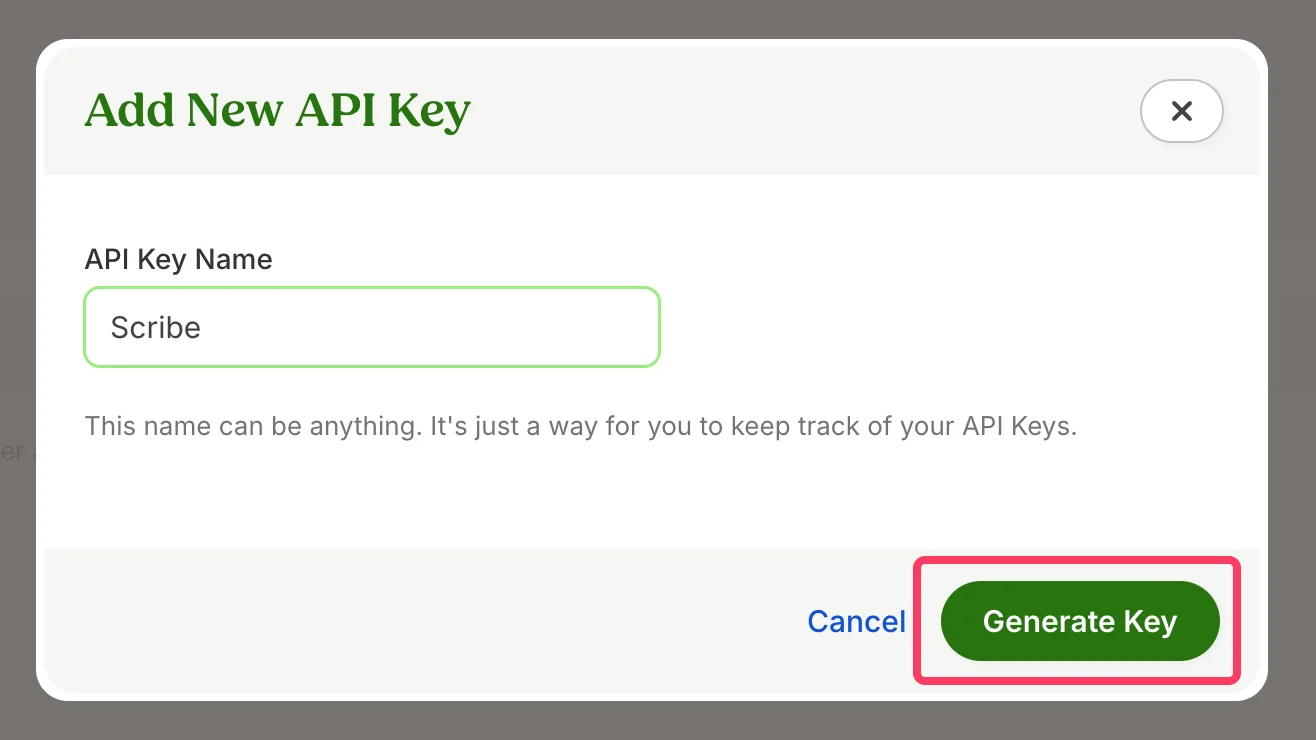
  <Step title="API 키 이름을 입력한 다음 Generate Key를 클릭하세요">
    키 이름은 원하는 대로 정할 수 있어요(예: "Scribe"). API 키를 구분하기 위한 이름이에요.
    <Frame>
      <img src="https://mintcdn.com/scribe/I5V9iTucPI_EY3nq/integrations/smart-fields/images/bamboohr-step-4.png?fit=max&auto=format&n=I5V9iTucPI_EY3nq&q=85&s=20524dcc449b4c6c0d9b5a145f671a3d" alt="이름 필드와 Generate Key 버튼이 있는 Add New API Key 대화상자" className="mx-auto" style={{ width:"71%" }} width="1316" height="740" data-path="integrations/smart-fields/images/bamboohr-step-4.png" />
    </Frame>
  </Step>

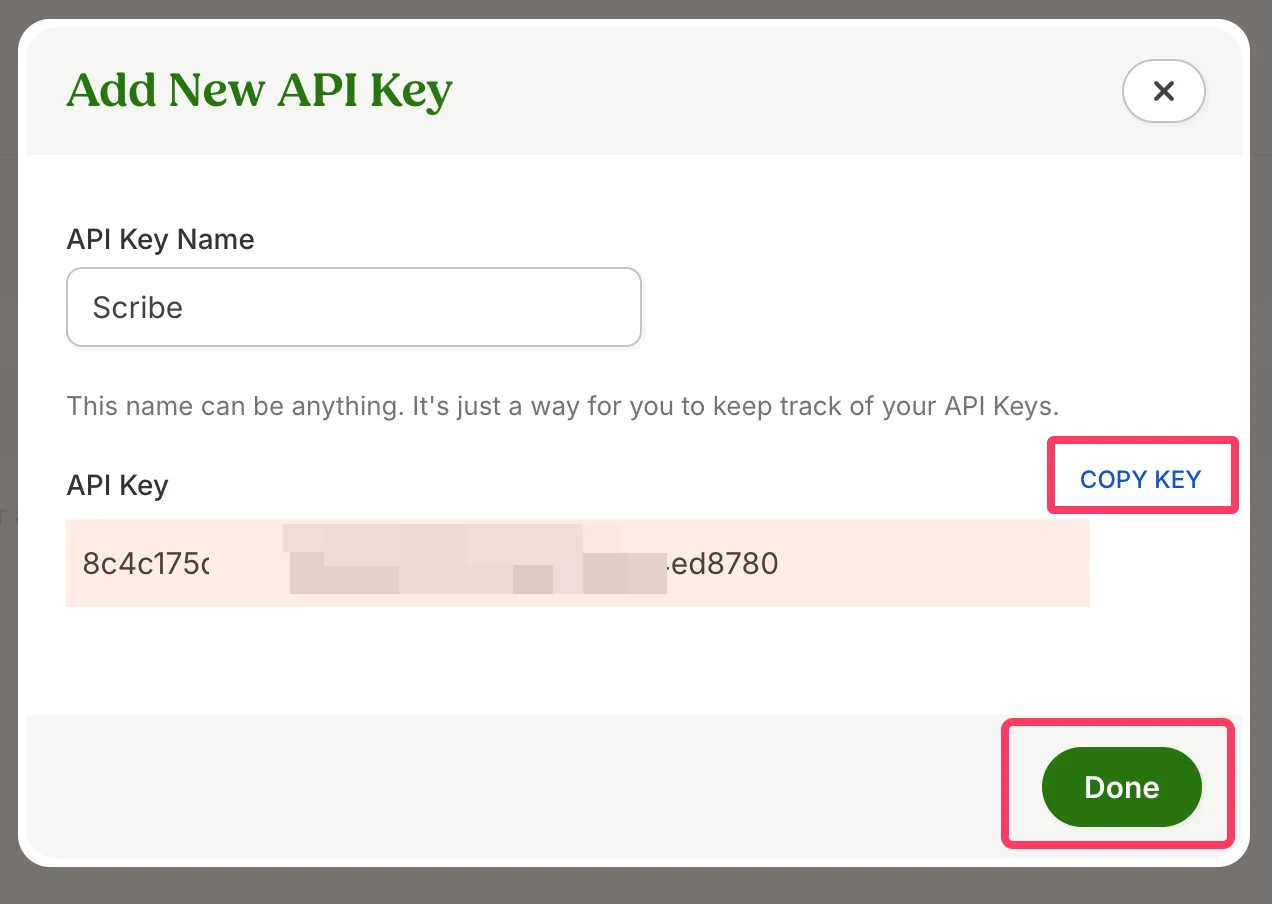
  <Step title="생성된 API 키를 복사해 Scribe의 BambooHR API 키 필드에 붙여 넣은 다음 &#x22;Done&#x22;을 클릭하세요">
    <Frame>
      <img src="https://mintcdn.com/scribe/I5V9iTucPI_EY3nq/integrations/smart-fields/images/bamboohr-step-5.png?fit=max&auto=format&n=I5V9iTucPI_EY3nq&q=85&s=0ab4f978b68d727c64e854164b4d0c20" alt="Copy Key 및 Done 버튼이 있는 생성된 API 키" className="mx-auto" style={{ width:"75%" }} width="1272" height="904" data-path="integrations/smart-fields/images/bamboohr-step-5.png" />
    </Frame>
  </Step>

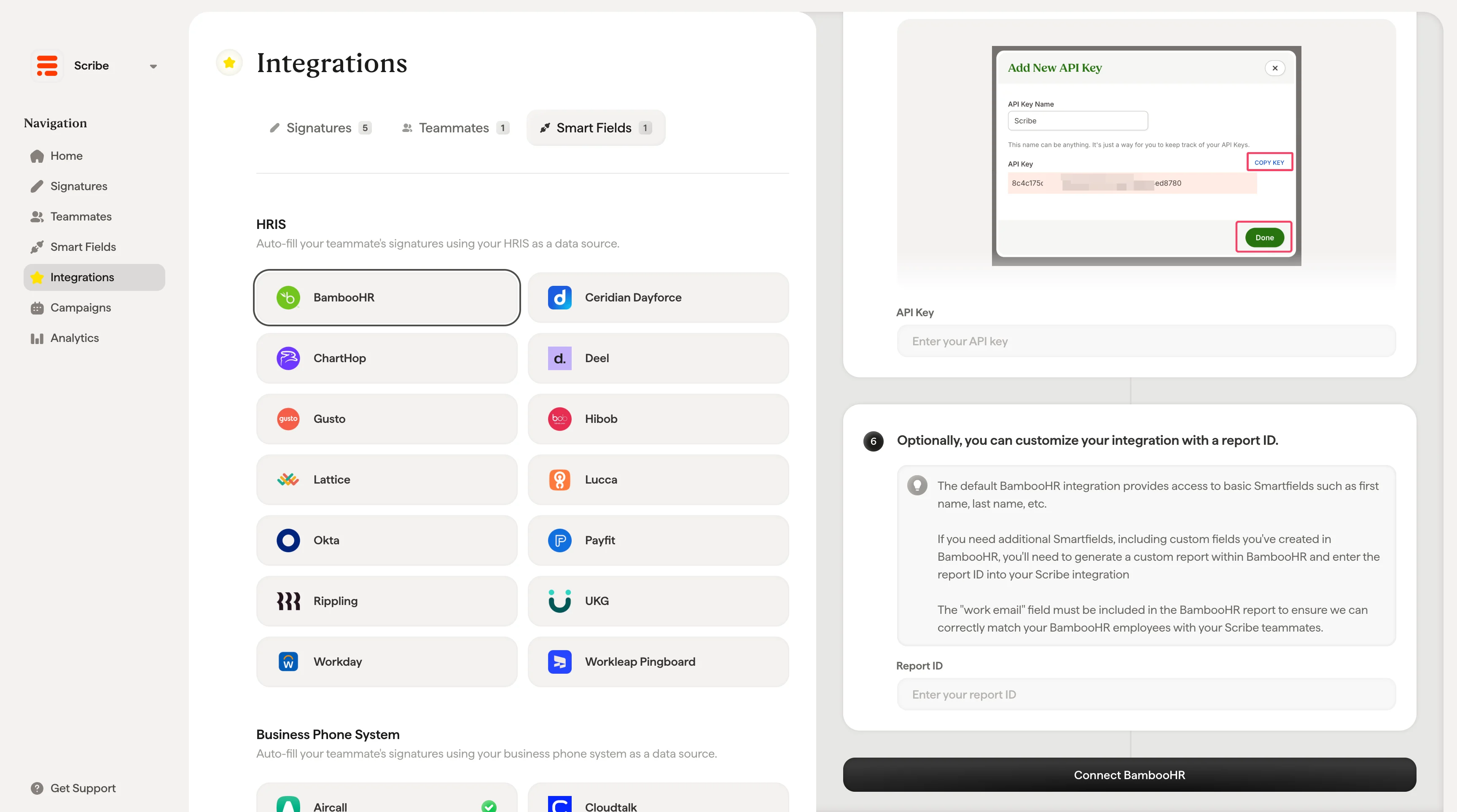
  <Step title="필요하면 리포트 ID로 연동을 커스터마이즈할 수 있어요.">
    기본 BambooHR 연동은 이름, 성 같은 기본 Smartfields에 접근할 수 있게 해 줘요.

    BambooHR에서 만든 사용자 정의 필드를 포함해 추가 Smartfields가 필요하다면 BambooHR에서 사용자 정의 리포트를 생성하고 해당 리포트 ID를 Scribe 연동에 입력해야 해요.

    <Warning>
      BambooHR의 직원과 Scribe 팀원을 정확히 매칭하려면 BambooHR 리포트에 "work email" 필드가 반드시 포함되어야 해요.
    </Warning>

    리포트 ID를 입력한 후 **Connect BambooHR**을 클릭하세요.
    <Frame>
      <img src="https://mintcdn.com/scribe/Z_G2D9X-Tlrxu_Eh/images/bamboohr-connect-integration-report-id.png?fit=max&auto=format&n=Z_G2D9X-Tlrxu_Eh&q=85&s=93c479407091642dfd7ced1de0c49b83" alt="Scribe의 BambooHR 리포트 ID 입력란과 Connect BambooHR 버튼" width="3456" height="1926" data-path="images/bamboohr-connect-integration-report-id.png" />
    </Frame>
  </Step>
</Steps>

## 관련 문서

* [Ceridian Dayforce](/ko/integrations/smart-fields/ceridian-dayforce-smart-fields): Ceridian Dayforce 데이터를 서명에 동기화해요.
* [ChartHop](/ko/integrations/smart-fields/charthop-smart-fields): ChartHop 데이터를 서명에 동기화해요.
* [서명에 팀원 할당](/ko/assign-teammates-to-a-signature): Smartfield 조건을 사용해 서명을 자동으로 할당해요.