> ## Documentation Index
> Fetch the complete documentation index at: https://help.scribe-mail.com/llms.txt
> Use this file to discover all available pages before exploring further.

# Workleap Pingboard

> 조직도·디렉터리 도구인 Workleap Pingboard에서 직책·부서 등의 정보를 동기화해 이메일 서명을 정확하고 최신 상태로 유지하세요.

Workleap Pingboard를 데이터 소스로 사용해 [팀원의 서명을 자동 입력](/ko/smart-fields)하려면 다음 단계를 따라 하세요.

<Info>
  **팀원이 별도로 할 작업은 없어요.**
</Info>

<Info>
  **Workleap Pingboard의 변경 사항은 Scribe로 자동 동기화돼요.**
</Info>

<Info>
  **SOC 2 Type II 인증.** [데이터는 안전하게 보호돼요](/ko/security/data-collection/pingboard).
</Info>

## 설치 가이드

### 사전 준비

* Pingboard 계정의 관리자 권한
* 관리자 권한이 있는 Scribe 계정

<Steps>
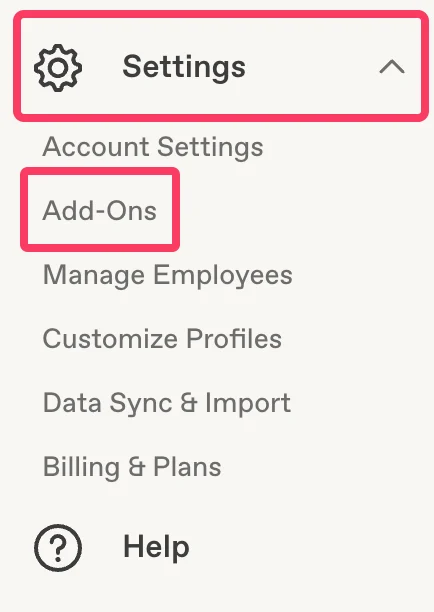
  <Step title="Pingboard 계정에서 'Settings' > 'Add-Ons'로 이동">
    Pingboard 계정에서 **Settings** 메뉴를 열고 **Add-Ons**를 클릭하세요.
    <Frame>
      <img src="https://mintcdn.com/scribe/pvZJQ56rCCLLmCwt/integrations/smart-fields/images/workleap-pingboard-step-1.png?fit=max&auto=format&n=pvZJQ56rCCLLmCwt&q=85&s=f521cb45ab27aff89dad87b3bd184b67" alt="Add-Ons 항목이 강조된 Pingboard Settings 메뉴" className="mx-auto" style={{ width:"51%" }} width="434" height="612" data-path="integrations/smart-fields/images/workleap-pingboard-step-1.png" />
    </Frame>
  </Step>

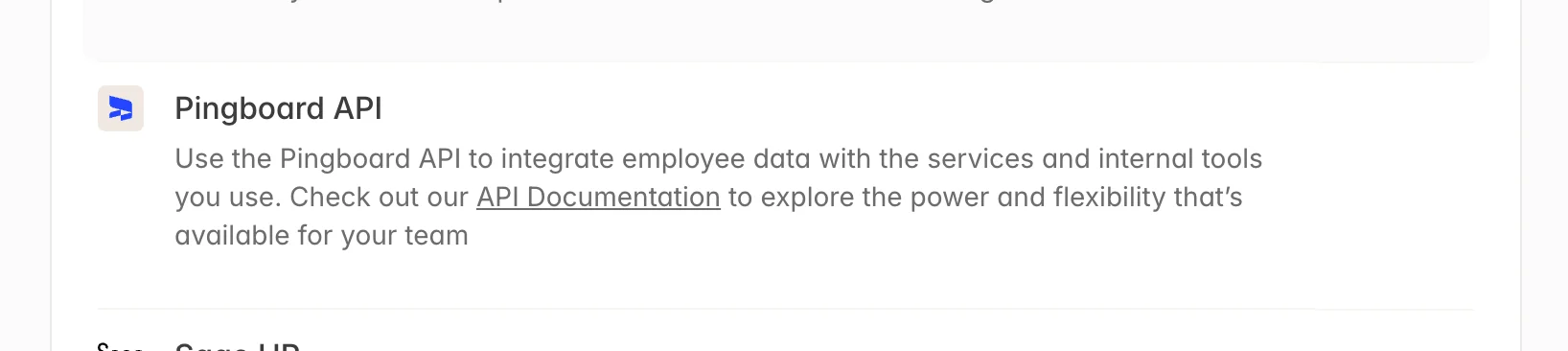
  <Step title="목록에서 'Pingboard API' 클릭">
    목록에서 **Pingboard API** 부가 기능을 선택하세요.

    <Frame>
      <img src="https://mintcdn.com/scribe/pvZJQ56rCCLLmCwt/integrations/smart-fields/images/workleap-pingboard-step-2.png?fit=max&auto=format&n=pvZJQ56rCCLLmCwt&q=85&s=bf07fe9adefec6f46149cc954b2c4d0f" alt="목록에 표시된 Pingboard API 부가 기능" className="mx-auto" width="1636" height="366" data-path="integrations/smart-fields/images/workleap-pingboard-step-2.png" />
    </Frame>
  </Step>

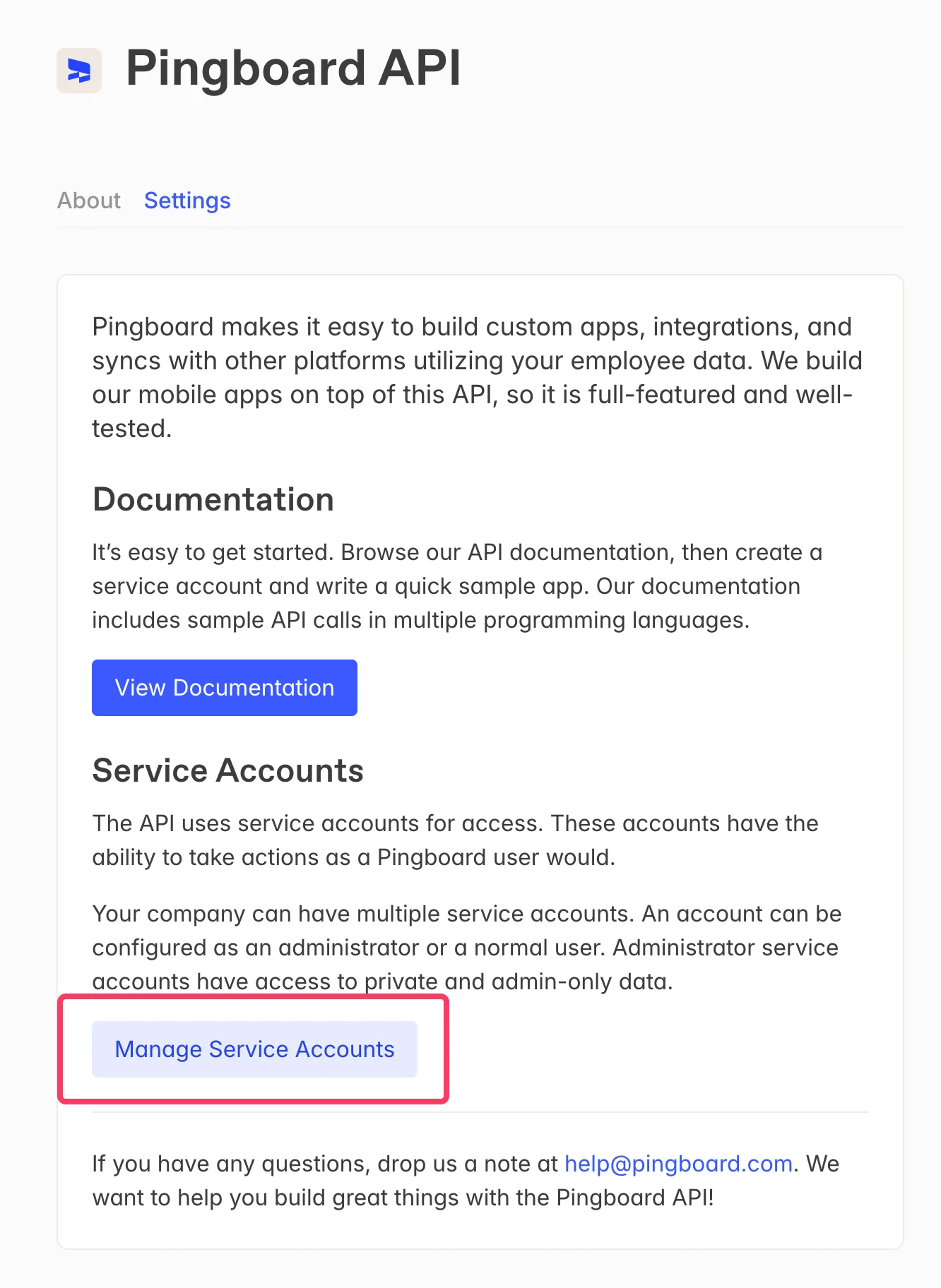
  <Step title="'Manage Service Accounts' 클릭">
    Pingboard API 페이지에서 **Manage Service Accounts**를 클릭하세요.
    <Frame>
      <img src="https://mintcdn.com/scribe/pvZJQ56rCCLLmCwt/integrations/smart-fields/images/workleap-pingboard-step-3.png?fit=max&auto=format&n=pvZJQ56rCCLLmCwt&q=85&s=3dc1903392aa0cd4920554be53ca622e" alt="Manage Service Accounts 버튼이 강조된 Pingboard API 페이지" className="mx-auto" style={{ width:"55%" }} width="1332" height="1824" data-path="integrations/smart-fields/images/workleap-pingboard-step-3.png" />
    </Frame>
  </Step>

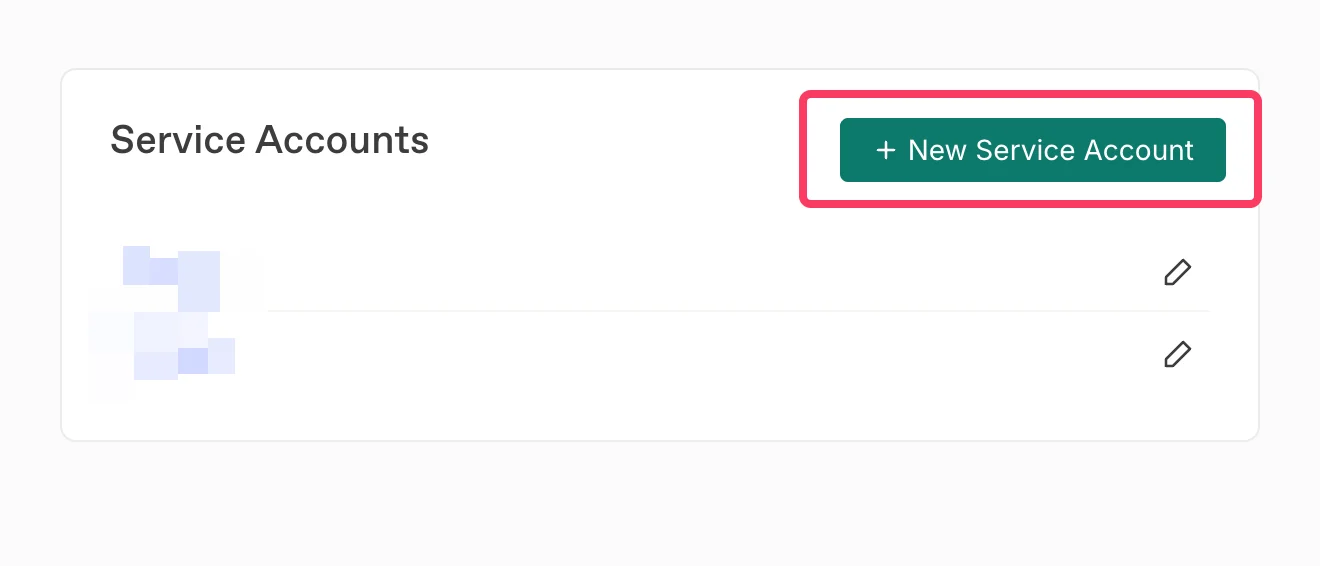
  <Step title="New Service Account 클릭">
    **+ New Service Account**를 클릭해 Scribe용 서비스 계정을 새로 만드세요.
    <Frame>
      <img src="https://mintcdn.com/scribe/pvZJQ56rCCLLmCwt/integrations/smart-fields/images/workleap-pingboard-step-4.png?fit=max&auto=format&n=pvZJQ56rCCLLmCwt&q=85&s=c4d8c5e3086c382eed874cef0c88feff" alt="New Service Account 버튼이 강조된 Service Accounts 페이지" className="mx-auto" style={{ width:"80%" }} width="1320" height="566" data-path="integrations/smart-fields/images/workleap-pingboard-step-4.png" />
    </Frame>
  </Step>

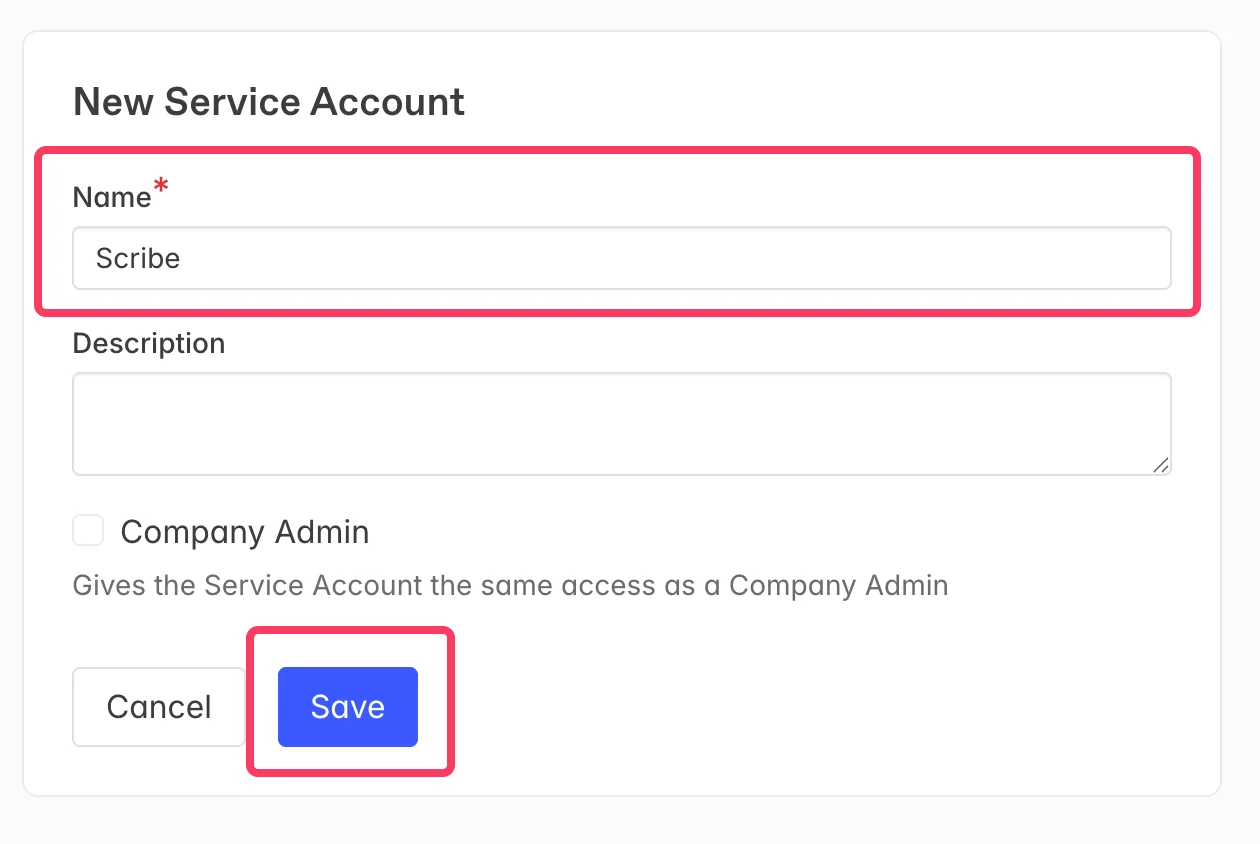
  <Step title="서비스 계정 키 이름을 입력하고 'Save' 클릭">
    서비스 계정 이름으로 **Scribe**를 입력한 다음 **Save**를 클릭하세요.
    <Frame>
      <img src="https://mintcdn.com/scribe/pvZJQ56rCCLLmCwt/integrations/smart-fields/images/workleap-pingboard-step-5.png?fit=max&auto=format&n=pvZJQ56rCCLLmCwt&q=85&s=2e02f681d2577c76243ee046a946cdd0" alt="이름이 Scribe로 입력된 새 서비스 계정 양식" className="mx-auto" style={{ width:"81%" }} width="1260" height="844" data-path="integrations/smart-fields/images/workleap-pingboard-step-5.png" />
    </Frame>
  </Step>

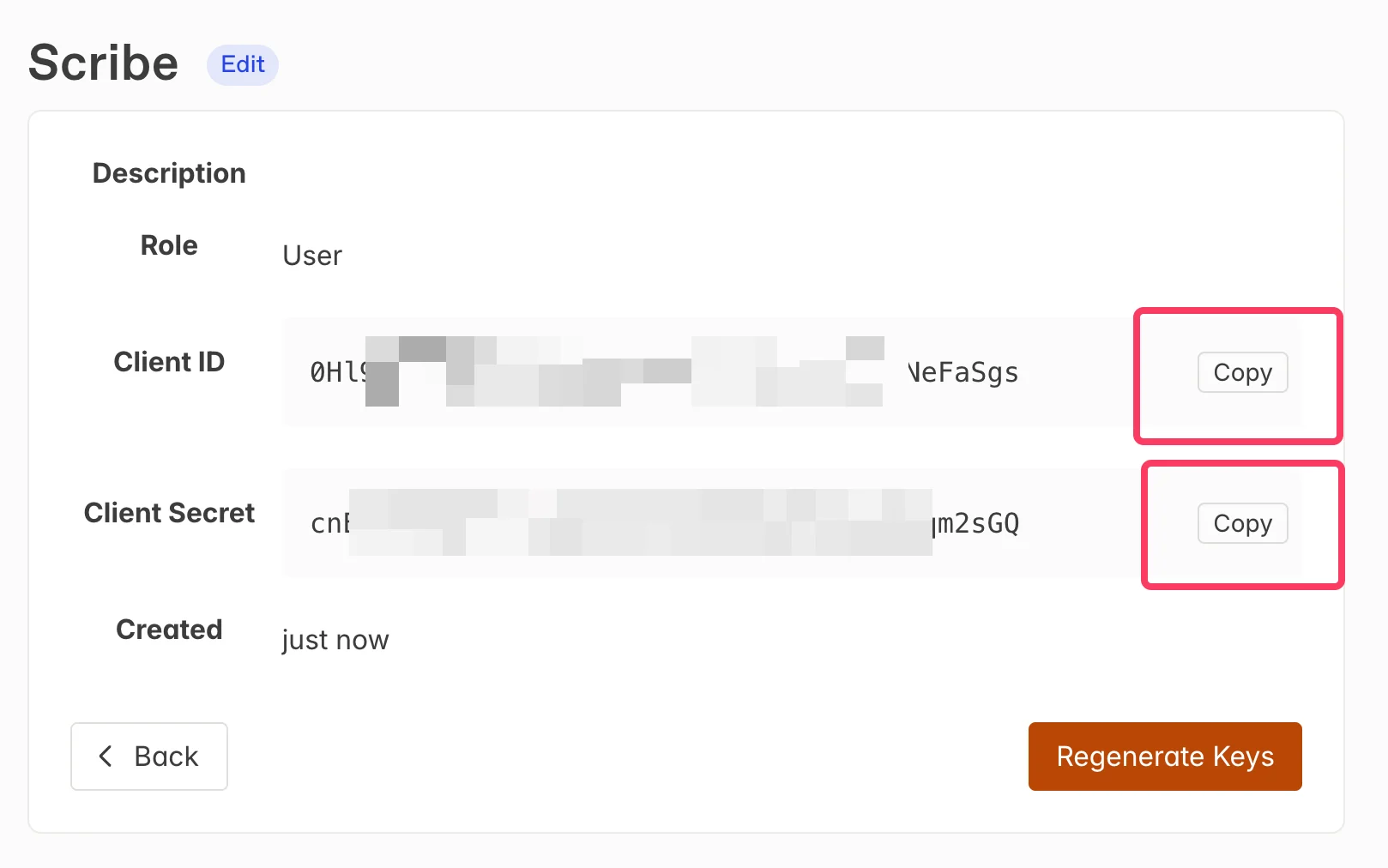
  <Step title="Client ID와 Client Secret을 복사한 뒤 아래 필드에 붙여 넣기">
    Pingboard에서 **Copy** 버튼으로 **Client ID**와 **Client Secret**을 복사한 뒤, Scribe의 해당 필드에 붙여 넣으세요. **Connect Pingboard**를 클릭하면 연동이 완료돼요.
    <Frame>
      <img src="https://mintcdn.com/scribe/pvZJQ56rCCLLmCwt/integrations/smart-fields/images/workleap-pingboard-step-6.png?fit=max&auto=format&n=pvZJQ56rCCLLmCwt&q=85&s=109136241fd76b4bce2383ecf9e8eff4" alt="Client ID와 Client Secret 복사 버튼이 있는 서비스 계정 자격 증명, 그리고 아래에 위치한 Scribe 입력 필드" className="mx-auto" style={{ width:"85%" }} width="1618" height="1012" data-path="integrations/smart-fields/images/workleap-pingboard-step-6.png" />
    </Frame>
  </Step>
</Steps>

## 관련 문서

* [BambooHR](/ko/integrations/smart-fields/bamboohr-smart-fields): BambooHR 데이터를 서명에 동기화해요.
* [Ceridian Dayforce](/ko/integrations/smart-fields/ceridian-dayforce-smart-fields): Ceridian Dayforce 데이터를 서명에 동기화해요.
* [팀원에게 서명 지정](/ko/assign-teammates-to-a-signature): Smartfield 조건을 사용해 서명을 자동으로 지정해요.