> ## Documentation Index
> Fetch the complete documentation index at: https://help.scribe-mail.com/llms.txt
> Use this file to discover all available pages before exploring further.
# 관리자 정책 적용됨
> Google Workspace를 Scribe와 동기화할 때 나타나는 Error 400 admin_policy_enforced 메시지를 관리 콘솔 권한을 알맞게 업데이트해 해결하세요.
[Google Workspace](/ko/integrations/teammates/google-workspace-teammates)를 동기화할 때 다음과 같은 오류 메시지가 나타날 수 있어요: Error 400: admin\_policy\_enforced.
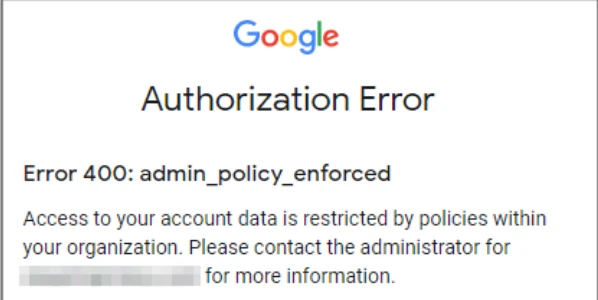 이 오류는 조직에서 Scribe의 Google 데이터 접근을 허용하지 않는다는 뜻이에요.
이 오류 메시지가 나타났다면 Google Workspace 계정의 관리자에게 Google 고객센터의 안내를 따르도록 요청하세요: [타사 및 내부 앱의 Google Workspace 데이터 접근 제어](https://support.google.com/a/answer/7281227).
## 관련 문서
* [Google Workspace 접근 권한 손실](/ko/troubleshooting/google-workspace-access-lost)
* [Google 부가 기능 인증 실패](/ko/troubleshooting/google-add-in-not-validating)
* [BambooHR 팀원 동기화 문제](/ko/troubleshooting/bamboohr-teammate-sync-not-working)
이 오류는 조직에서 Scribe의 Google 데이터 접근을 허용하지 않는다는 뜻이에요.
이 오류 메시지가 나타났다면 Google Workspace 계정의 관리자에게 Google 고객센터의 안내를 따르도록 요청하세요: [타사 및 내부 앱의 Google Workspace 데이터 접근 제어](https://support.google.com/a/answer/7281227).
## 관련 문서
* [Google Workspace 접근 권한 손실](/ko/troubleshooting/google-workspace-access-lost)
* [Google 부가 기능 인증 실패](/ko/troubleshooting/google-add-in-not-validating)
* [BambooHR 팀원 동기화 문제](/ko/troubleshooting/bamboohr-teammate-sync-not-working)