> ## Documentation Index
> Fetch the complete documentation index at: https://help.scribe-mail.com/llms.txt
> Use this file to discover all available pages before exploring further.
# 이미지가 표시되지 않아요
> Scribe로 만든 Apple Mail 이메일 서명에서 이미지가 표시되지 않을 때 Mail 개인정보 보호 설정을 조정하고 서명 캐시 데이터를 삭제해 문제를 해결하세요.
이메일을 보낼 때 이미지가 표시되지 않으면 개인정보 보호 설정을 확인하고 "Protect Mail Activity" 옵션을 비활성화하세요.
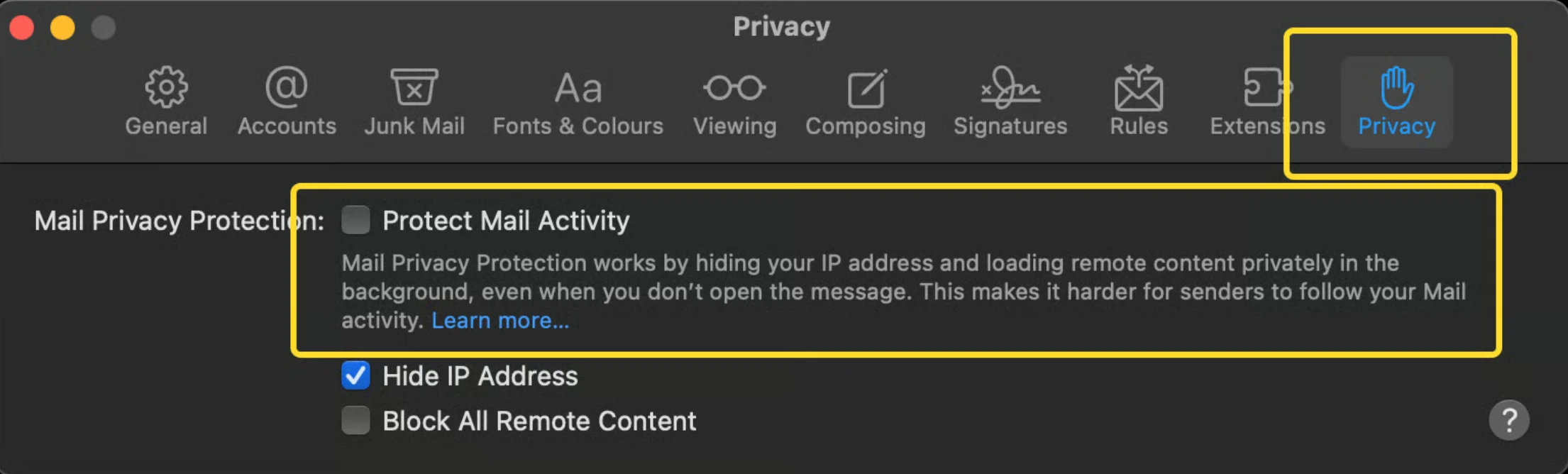 이 설정을 비활성화해도 [Apple Mail](/ko/integrations/signatures/apple-mail)에서 이미지가 표시되지 않을 때가 있어요. 이는 Apple Mail HTML 서명의 알려진 버그예요. 하지만 걱정하지 마세요. 수신자에게는 이미지가 정상적으로 표시돼요.
## 관련 문서
* [서명을 설치할 수 없음](/ko/troubleshooting/unable-to-install-signature)
* [서명이 표시되지 않음](/ko/troubleshooting/signature-not-appearing)
* [서명 설치하기](/ko/install-signatures)
이 설정을 비활성화해도 [Apple Mail](/ko/integrations/signatures/apple-mail)에서 이미지가 표시되지 않을 때가 있어요. 이는 Apple Mail HTML 서명의 알려진 버그예요. 하지만 걱정하지 마세요. 수신자에게는 이미지가 정상적으로 표시돼요.
## 관련 문서
* [서명을 설치할 수 없음](/ko/troubleshooting/unable-to-install-signature)
* [서명이 표시되지 않음](/ko/troubleshooting/signature-not-appearing)
* [서명 설치하기](/ko/install-signatures)