> ## Documentation Index
> Fetch the complete documentation index at: https://help.scribe-mail.com/llms.txt
> Use this file to discover all available pages before exploring further.
# Beheerdersbeleid afgedwongen
> Los de foutmelding 'Error 400 admin_policy_enforced' op bij het synchroniseren van Google Workspace met Scribe door de juiste machtigingen in de Admin Console aan te passen.
Wanneer je je [Google Workspace](/nl/integrations/teammates/google-workspace-teammates) probeert te synchroniseren, krijg je mogelijk de foutmelding: Error 400: admin\_policy\_enforced.
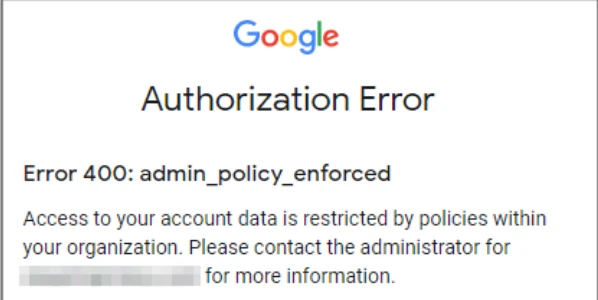 Deze fout betekent dat je organisatie Scribe geen toegang geeft tot Google-gegevens.
Heb je dit foutbericht gekregen? Laat een beheerder van jullie Google Workspace-account de instructies uit het helpcentrum van Google volgen: [Bepalen welke externe en interne apps toegang hebben tot Google Workspace-gegevens](https://support.google.com/a/answer/7281227).
## Gerelateerde artikelen
* [Toegang tot Google Workspace verloren](/nl/troubleshooting/google-workspace-access-lost)
* [Google-invoegtoepassing valideert niet](/nl/troubleshooting/google-add-in-not-validating)
* [Synchronisatie van BambooHR-teamleden werkt niet](/nl/troubleshooting/bamboohr-teammate-sync-not-working)
Deze fout betekent dat je organisatie Scribe geen toegang geeft tot Google-gegevens.
Heb je dit foutbericht gekregen? Laat een beheerder van jullie Google Workspace-account de instructies uit het helpcentrum van Google volgen: [Bepalen welke externe en interne apps toegang hebben tot Google Workspace-gegevens](https://support.google.com/a/answer/7281227).
## Gerelateerde artikelen
* [Toegang tot Google Workspace verloren](/nl/troubleshooting/google-workspace-access-lost)
* [Google-invoegtoepassing valideert niet](/nl/troubleshooting/google-add-in-not-validating)
* [Synchronisatie van BambooHR-teamleden werkt niet](/nl/troubleshooting/bamboohr-teammate-sync-not-working)