

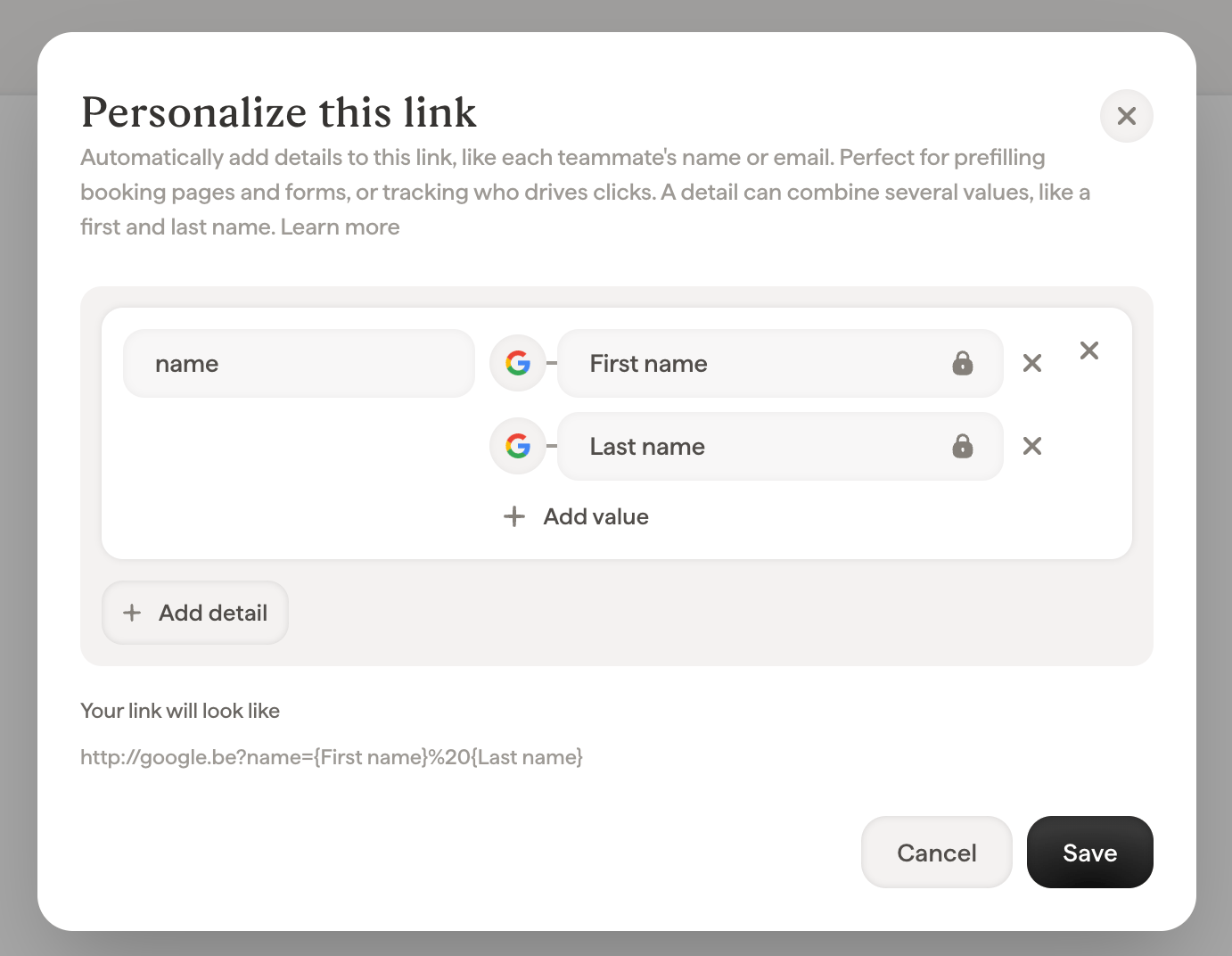
How to personalize a link
- In the editor, select the block that carries the link (a button, an image, a social icon, or a text selection) and open its Link field.
- Click Personalize this link under the URL.
- Add one or more details. Each detail has a name (what the destination page receives, e.g.
nameorutm_content) and one or more values: fixed text, or a Smart Field that fills in per teammate. Click Add value to combine several values in one detail, like a first name and a last name: Scribe joins them with a space. - Check Your link will look like to see the final URL, with Smart Fields shown as placeholders like
{First name}and the joining space shown as%20. - Click Save.
Example: prefill a booking page or form
Say your sales team’s signatures have a Book a call button pointing to your scheduling page. Add these details so the booking form opens pre-filled with the sender’s information:
Your link will look like
https://cal.example.com/acme?name={First name}&email={Email}. When a prospect clicks the button in Jane’s email, the booking page already knows they were talking to Jane: one less form to fill, fewer drop-offs, and the meeting lands with the right person. The same approach prefills contact forms, demo requests, and survey tools that accept URL parameters (most scheduling and form products do).
Example: track who drives clicks with UTM parameters
To see in your analytics tool which teammate’s signature drives traffic, add standard UTM parameters:
Your link will look like
https://www.example.com/pricing?utm_source=email-signature&utm_medium=email&utm_content={First name}%20{Last name}. Every click now arrives tagged with the campaign source and the full name of the teammate who sent the email, so your analytics tool can answer “which signatures convert?”.
How is this different from Scribe’s built-in tracking?
Personalized link details and Scribe’s analytics are two different datasets. Scribe measures your signatures and reports inside Scribe; personalized details are sent to your own tools and reported there. Neither replaces or changes the other.
Adding personalized details never changes or replaces Scribe’s tracking: both keep working on the same links, each feeding its own reports. Use Scribe analytics to compare signatures and campaigns inside Scribe, and personalized details to make signature traffic visible inside the tools your team already uses.
Because each side counts with its own rules, don’t expect the two reports to show identical numbers. Scribe counts every click on the signature link itself, while your analytics tool applies its own sessions, filters, and consent handling. Treat each report as its own source of truth for what it measures.
Good to know
- One detail can combine several values. Add as many values as you need to a detail (Smart Fields, fixed text, or a mix); Scribe joins them with a single space, encoded as
%20in the URL. - Missing data never breaks a link. If a teammate’s Smart Field is empty, that value is simply left out. When every value of a detail is empty, the whole detail is left off their link, and the link still works.
- Existing URL parameters are kept. If the destination URL already contains parameters, your details are merged in, and a detail with the same name replaces the URL’s own value.
- Everything is encoded for you. Spaces, accents, and special characters in values are safely encoded, so there is nothing to prepare.
- Email and phone links can’t be personalized. Links to an email address (
mailto:) or phone number (tel:) don’t carry details.
Frequently asked questions
Can I add UTM parameters to my email signature links?
Yes. Open the link’s Personalize this link option and add your UTM parameters as details: fixed text forutm_source and utm_medium, and a Smart Field (like First name) for utm_content to identify the teammate. Every signature gets the right values automatically.
Can one parameter contain both the first name and the last name?
Yes. Add the detail (for exampleutm_content or name), bind its first value to the First name Smart Field, click Add value and bind the second one to Last name. The link then carries utm_content={First name}%20{Last name}, filled in per teammate. You can mix in fixed text too, and add as many values as you need.
Can I prefill a Calendly, HubSpot, or Typeform page from an email signature?
Yes. Add details whose names match the parameters your scheduling or form tool accepts (for examplename and email), and bind their values to Smart Fields. Each teammate’s link then opens the page pre-filled with their own details.