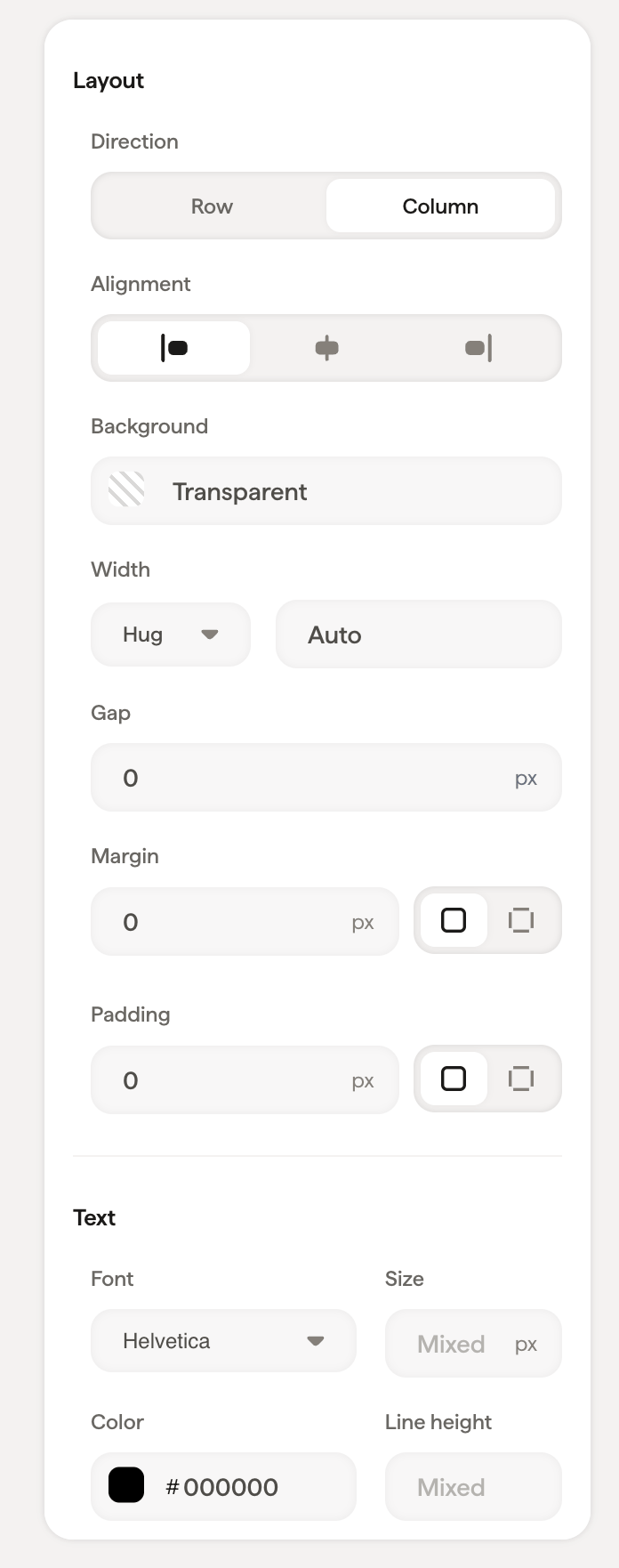
Arrange and space your email signature with containers, setting row or column direction, alignment, background, gap, and padding for every block inside.
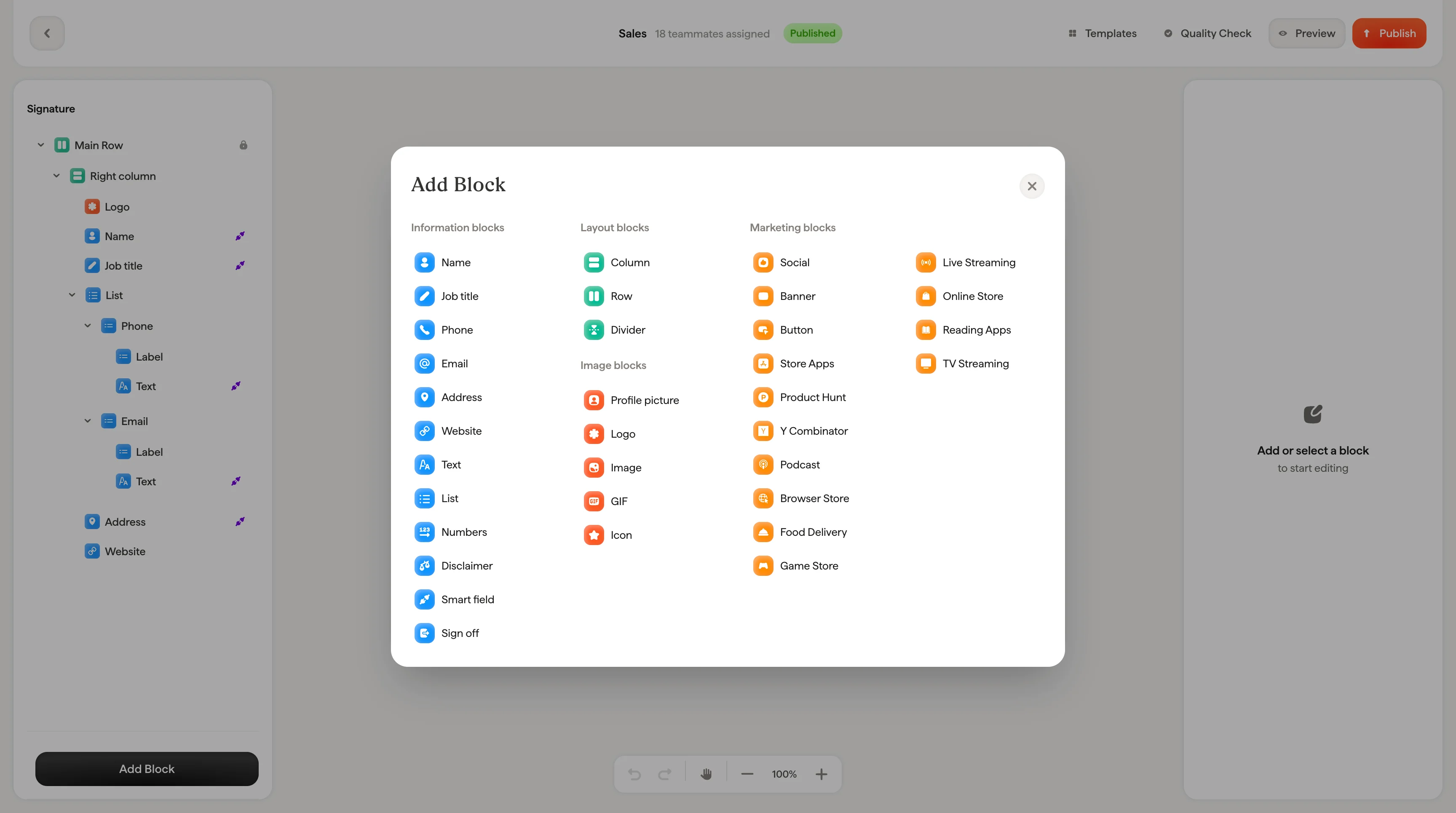
When you select a container (like the main column or a row), the styling panel shows layout controls that affect everything inside it. Containers are the structural backbone of your signature: they determine how blocks are arranged and spaced. For a step-by-step walkthrough, see building layouts with columns and rows.
Choose Row (elements side by side) or Column (elements stacked)
Alignment
Align content left, center, or right within the container
Background
Set a background color using the color picker or a hex code
Gap
Space between child elements inside the container
Padding
Space between the container edge and its content. Use the global input for equal padding on all sides, or expand to set Top, Right, Bottom, and Left individually
Use Direction → Row combined with Alignment → Center to center elements horizontally. For example, centering social icons in a row.
When a container includes text content, the text section appears with font, size, color, opacity, line height, and formatting options. These settings apply as defaults to text inside the container.
{"docsConfig":{"theme":"mint","$schema":"https://mintlify.com/schema.json","name":"Scribe Mail Documentation","description":"Learn how to create, manage, and deploy professional email signatures at scale with Scribe. Find step by step guides for the signature editor, teammate management, smart fields, campaign banners, analytics, integrations with Google Workspace and Microsoft 365, API access, MCP server connection, and more.","colors":{"primary":"#FD5721","light":"#FD5721","dark":"#FD5721"},"logo":{"light":"https://mintcdn.com/scribe/rBwYeOF3Rj63uiuF/logo/light.svg?fit=max\u0026auto=format\u0026n=rBwYeOF3Rj63uiuF\u0026q=85\u0026s=76534d22a2e75a5a9ea0e852f0c45a20","dark":"https://mintcdn.com/scribe/rBwYeOF3Rj63uiuF/logo/dark.svg?fit=max\u0026auto=format\u0026n=rBwYeOF3Rj63uiuF\u0026q=85\u0026s=e9ddbc8308b1a2a0cb116fdb4ddbc4ad"},"favicon":"https://mintcdn.com/scribe/viKPFTjse_ZIHgzR/favicon.svg?fit=max\u0026auto=format\u0026n=viKPFTjse_ZIHgzR\u0026q=85\u0026s=f660b139502109050340e578cdecd19f","navbar":{"links":[{"href":"https://cal.com/forms/33a695aa-3046-40da-ba42-1d7cbb815da3","label":"Book a demo"},{"href":"https://app.scribe-mail.com/login","label":"Login"},{"href":"https://app.scribe-mail.com/registration","label":"Start 14-days free trial","type":"button"}]},"footer":{"socials":{"x":"https://x.com/ScribeMail","linkedin":"https://www.linkedin.com/company/scribemail","website":"https://www.scribe-mail.com/","instagram":"https://www.instagram.com/scribe_mail","youtube":"https://www.youtube.com/@scribe-email-signatures/featured"}},"seo":{"metatags":{"twitter:site":"@ScribeMail"},"indexing":"all"},"fonts":{"family":"Inter"},"icons":{"library":"lucide"},"integrations":{"ga4":{"measurementId":"G-CEG0NJ333Y"},"posthog":{"apiKey":"phc_zFx4ffhm0OjiQvy9PmXaPUGs1BkA4rsE8ZQw8q6BYop","apiHost":"https://eu.i.posthog.com","sessionRecording":false}},"contextual":{"options":["copy","view","assistant","download-spec","chatgpt","claude","perplexity","grok","aistudio","windsurf","mcp","cursor","vscode"],"display":"header"},"styling":{"latex":true},"navigation":{"languages":[{"language":"en","default":true,"href":"en/why-email-signatures"},{"language":"fr","href":"fr/why-email-signatures"},{"language":"de","href":"de/why-email-signatures"},{"language":"it","href":"it/why-email-signatures"},{"language":"es","href":"es/why-email-signatures"},{"language":"pt-BR","href":"pt-BR/why-email-signatures"},{"language":"nl","href":"nl/why-email-signatures"},{"language":"sv","href":"sv/why-email-signatures"},{"language":"no","href":"no/why-email-signatures"},{"language":"pl","href":"pl/why-email-signatures"},{"language":"id","href":"id/why-email-signatures"},{"language":"ja","href":"ja/why-email-signatures"},{"language":"ko","href":"ko/why-email-signatures"}]}},"deployment":{"deploymentMetadataValue":{"subdomain":"scribe","hasAudioNarration":false,"actualSubdomain":"scribe","customDomains":["help.scribe-mail.com"],"gitSource":{"type":"github","owner":"scribemail","repo":"documentation","deployBranch":"main","contentDirectory":"","isPrivate":true,"mountPath":"","label":""},"chroma":{"liveDeploymentHistoryId":"6ae4aeeed2f3537f5ebaf950","collectionId":"70b3c95f-10be-4dae-bd15-e6074af84aac","schemaVersion":"v3","latestBuiltDeploymentHistoryId":"6ae4aeeed2f3537f5ebaf950"},"feedback":{"thumbs":true},"entitlements":{"AI_CHAT":{"status":"ENABLED"}},"buildId":"6ae4aeeed2f3537f5ebaf950","clientVersion":"0.0.4043","searchFilterCounts":[{"language":"de","tag":"Product documentation","count":126},{"language":"en","tag":"Product documentation","count":126},{"language":"es","tag":"Product documentation","count":126},{"language":"fr","tag":"Product documentation","count":126},{"language":"id","tag":"Product documentation","count":126},{"language":"it","tag":"Product documentation","count":126},{"language":"ja","tag":"Product documentation","count":126},{"language":"ko","tag":"Product documentation","count":126},{"language":"nl","tag":"Product documentation","count":126},{"language":"no","tag":"Product documentation","count":126},{"language":"pl","tag":"Product documentation","count":126},{"language":"pt-BR","tag":"Product documentation","count":126},{"language":"sv","tag":"Product documentation","count":126},{"language":"default","tag":"API Reference","count":74},{"language":"de","tag":"Integrations","count":46},{"language":"en","tag":"Integrations","count":46},{"language":"es","tag":"Integrations","count":46},{"language":"fr","tag":"Integrations","count":46},{"language":"id","tag":"Integrations","count":46},{"language":"it","tag":"Integrations","count":46},{"language":"ja","tag":"Integrations","count":46},{"language":"ko","tag":"Integrations","count":46},{"language":"nl","tag":"Integrations","count":46},{"language":"no","tag":"Integrations","count":46},{"language":"pl","tag":"Integrations","count":46},{"language":"pt-BR","tag":"Integrations","count":46},{"language":"sv","tag":"Integrations","count":46},{"language":"de","tag":"Introduction","count":40},{"language":"en","tag":"Introduction","count":40},{"language":"es","tag":"Introduction","count":40},{"language":"fr","tag":"Introduction","count":40},{"language":"id","tag":"Introduction","count":40},{"language":"it","tag":"Introduction","count":40},{"language":"ja","tag":"Introduction","count":40},{"language":"ko","tag":"Introduction","count":40},{"language":"nl","tag":"Introduction","count":40},{"language":"no","tag":"Introduction","count":40},{"language":"pl","tag":"Introduction","count":40},{"language":"pt-BR","tag":"Introduction","count":40},{"language":"sv","tag":"Introduction","count":40},{"language":"de","tag":"Signatures","count":33},{"language":"de","tag":"Security","count":33},{"language":"en","tag":"Signatures","count":33},{"language":"en","tag":"Security","count":33},{"language":"es","tag":"Signatures","count":33},{"language":"es","tag":"Security","count":33},{"language":"fr","tag":"Signatures","count":33},{"language":"fr","tag":"Security","count":33},{"language":"id","tag":"Signatures","count":33},{"language":"id","tag":"Security","count":33},{"language":"it","tag":"Signatures","count":33},{"language":"it","tag":"Security","count":33},{"language":"ja","tag":"Signatures","count":33},{"language":"ja","tag":"Security","count":33},{"language":"ko","tag":"Signatures","count":33},{"language":"ko","tag":"Security","count":33},{"language":"nl","tag":"Signatures","count":33},{"language":"nl","tag":"Security","count":33},{"language":"no","tag":"Signatures","count":33},{"language":"no","tag":"Security","count":33},{"language":"pl","tag":"Signatures","count":33},{"language":"pl","tag":"Security","count":33},{"language":"pt-BR","tag":"Signatures","count":33},{"language":"pt-BR","tag":"Security","count":33},{"language":"sv","tag":"Signatures","count":33},{"language":"sv","tag":"Security","count":33},{"language":"de","tag":"Troubleshooting","count":24},{"language":"en","tag":"Troubleshooting","count":24},{"language":"es","tag":"Troubleshooting","count":24},{"language":"fr","tag":"Troubleshooting","count":24},{"language":"id","tag":"Troubleshooting","count":24},{"language":"it","tag":"Troubleshooting","count":24},{"language":"ja","tag":"Troubleshooting","count":24},{"language":"ko","tag":"Troubleshooting","count":24},{"language":"nl","tag":"Troubleshooting","count":24},{"language":"no","tag":"Troubleshooting","count":24},{"language":"pl","tag":"Troubleshooting","count":24},{"language":"pt-BR","tag":"Troubleshooting","count":24},{"language":"sv","tag":"Troubleshooting","count":24},{"language":"de","tag":"Smart Fields","count":23},{"language":"en","tag":"Smart Fields","count":23},{"language":"es","tag":"Smart Fields","count":23},{"language":"fr","tag":"Smart Fields","count":23},{"language":"id","tag":"Smart Fields","count":23},{"language":"it","tag":"Smart Fields","count":23},{"language":"ja","tag":"Smart Fields","count":23},{"language":"ko","tag":"Smart Fields","count":23},{"language":"nl","tag":"Smart Fields","count":23},{"language":"no","tag":"Smart Fields","count":23},{"language":"pl","tag":"Smart Fields","count":23},{"language":"pt-BR","tag":"Smart Fields","count":23},{"language":"sv","tag":"Smart Fields","count":23},{"language":"default","tag":"Signatures","count":22},{"language":"de","tag":"Data \u0026 Privacy","count":19},{"language":"en","tag":"Data \u0026 Privacy","count":19},{"language":"es","tag":"Data \u0026 Privacy","count":19},{"language":"fr","tag":"Data \u0026 Privacy","count":19},{"language":"id","tag":"Data \u0026 Privacy","count":19},{"language":"it","tag":"Data \u0026 Privacy","count":19},{"language":"ja","tag":"Data \u0026 Privacy","count":19},{"language":"ko","tag":"Data \u0026 Privacy","count":19},{"language":"nl","tag":"Data \u0026 Privacy","count":19},{"language":"no","tag":"Data \u0026 Privacy","count":19},{"language":"pl","tag":"Data \u0026 Privacy","count":19},{"language":"pt-BR","tag":"Data \u0026 Privacy","count":19},{"language":"sv","tag":"Data \u0026 Privacy","count":19},{"language":"de","tag":"Editor","count":18},{"language":"en","tag":"Editor","count":18},{"language":"es","tag":"Editor","count":18},{"language":"fr","tag":"Editor","count":18},{"language":"id","tag":"Editor","count":18},{"language":"it","tag":"Editor","count":18},{"language":"ja","tag":"Editor","count":18},{"language":"ko","tag":"Editor","count":18},{"language":"nl","tag":"Editor","count":18},{"language":"no","tag":"Editor","count":18},{"language":"pl","tag":"Editor","count":18},{"language":"pt-BR","tag":"Editor","count":18},{"language":"sv","tag":"Editor","count":18},{"language":"de","tag":"Data collection","count":16},{"language":"en","tag":"Data collection","count":16},{"language":"es","tag":"Data collection","count":16},{"language":"fr","tag":"Data collection","count":16},{"language":"id","tag":"Data collection","count":16},{"language":"it","tag":"Data collection","count":16},{"language":"ja","tag":"Data collection","count":16},{"language":"ko","tag":"Data collection","count":16},{"language":"nl","tag":"Data collection","count":16},{"language":"no","tag":"Data collection","count":16},{"language":"pl","tag":"Data collection","count":16},{"language":"pt-BR","tag":"Data collection","count":16},{"language":"sv","tag":"Data collection","count":16},{"language":"default","tag":"Marketing campaigns","count":8},{"language":"default","tag":"Get started","count":6},{"language":"default","tag":"Webhooks","count":6},{"language":"default","tag":"Emails","count":5},{"language":"default","tag":"Assets","count":4},{"language":"default","tag":"Folders","count":4},{"language":"default","tag":"Smart fields","count":4},{"language":"default","tag":"Teammates","count":4}]},"assistantConfig":{"enableAskAiButton":false,"enableStarterQuestions":false,"enableAskAiSearchBar":true,"deflection":{"enabled":true,"email":"support@scribe-mail.com","showHelpButton":true}},"basePath":"","hasChatPermissions":true,"hasWebMcpPermissions":false,"toggles":[{"name":"kill-isr","enabled":true,"variant":{"name":"disabled","enabled":false,"feature_enabled":true},"impressionData":false},{"name":"agent-mintlify-slack","enabled":true,"variant":{"name":"disabled","enabled":false,"feature_enabled":true},"impressionData":false},{"name":"agent-integrations-settings","enabled":true,"variant":{"name":"disabled","enabled":false,"feature_enabled":true},"impressionData":false},{"name":"automations-pr-grouping","enabled":true,"variant":{"name":"disabled","enabled":false,"feature_enabled":true},"impressionData":false},{"name":"custom-prefix","enabled":true,"variant":{"name":"disabled","enabled":false,"feature_enabled":true},"impressionData":false},{"name":"analytics-v7","enabled":true,"variant":{"name":"disabled","enabled":false,"feature_enabled":true},"impressionData":false},{"name":"user-flows-analytics","enabled":true,"variant":{"name":"disabled","enabled":false,"feature_enabled":true},"impressionData":false},{"name":"no-publish-flow","enabled":true,"variant":{"name":"disabled","enabled":false,"feature_enabled":true},"impressionData":false},{"name":"workos-onboarding","enabled":true,"variant":{"name":"disabled","enabled":false,"feature_enabled":true},"impressionData":false},{"name":"llms-txt-v2","enabled":true,"variant":{"name":"disabled","enabled":false,"feature_enabled":true},"impressionData":false},{"name":"snapshot-serving-live","enabled":true,"variant":{"name":"disabled","enabled":false,"feature_enabled":true},"impressionData":false},{"name":"stripTemperatureMiddleware","enabled":true,"variant":{"name":"disabled","enabled":false,"feature_enabled":true},"impressionData":false},{"name":"support-platform-pylon-zendesk","enabled":true,"variant":{"name":"disabled","enabled":false,"feature_enabled":true},"impressionData":false},{"name":"snapshot-serving","enabled":true,"variant":{"name":"disabled","enabled":false,"feature_enabled":true},"impressionData":false},{"name":"instant-rollback","enabled":true,"variant":{"name":"disabled","enabled":false,"feature_enabled":true},"impressionData":false},{"name":"granular-notifications-server","enabled":true,"variant":{"name":"disabled","enabled":false,"feature_enabled":true},"impressionData":false},{"name":"granular-notifications","enabled":true,"variant":{"name":"disabled","enabled":false,"feature_enabled":true},"impressionData":false},{"name":"automations-fable","enabled":true,"variant":{"name":"disabled","enabled":false,"feature_enabled":true},"impressionData":false},{"name":"fixed-ai-action-pricing","enabled":true,"variant":{"name":"disabled","enabled":false,"feature_enabled":true},"impressionData":false},{"name":"automation-resolve-merge-conflict","enabled":true,"variant":{"name":"disabled","enabled":false,"feature_enabled":true},"impressionData":false},{"name":"scoped-publishing","enabled":true,"variant":{"name":"disabled","enabled":false,"feature_enabled":true},"impressionData":false},{"name":"mintql","enabled":true,"variant":{"name":"disabled","enabled":false,"feature_enabled":true},"impressionData":false},{"name":"page-level-analytics","enabled":true,"variant":{"name":"disabled","enabled":false,"feature_enabled":true},"impressionData":false},{"name":"editor-version-history-v2","enabled":true,"variant":{"name":"disabled","enabled":false,"feature_enabled":true},"impressionData":false},{"name":"billing-page-v2","enabled":true,"variant":{"name":"disabled","enabled":false,"feature_enabled":true},"impressionData":false},{"name":"full-page-search","enabled":true,"variant":{"name":"disabled","enabled":false,"feature_enabled":true},"impressionData":false},{"name":"workspace-projects","enabled":true,"variant":{"name":"disabled","enabled":false,"feature_enabled":true},"impressionData":false},{"name":"assistant-v5","enabled":true,"variant":{"name":"disabled","enabled":false,"feature_enabled":true},"impressionData":false},{"name":"byok-sep-25","enabled":true,"variant":{"name":"disabled","enabled":false,"feature_enabled":true},"impressionData":false},{"name":"fork-pr-previews","enabled":true,"variant":{"name":"disabled","enabled":false,"feature_enabled":true},"impressionData":false},{"name":"revalidation-jwt","enabled":true,"variant":{"name":"disabled","enabled":false,"feature_enabled":true},"impressionData":false},{"name":"vite-origin","enabled":true,"variant":{"name":"disabled","enabled":false,"feature_enabled":true},"impressionData":false},{"name":"billing-updated-9-15","enabled":true,"variant":{"name":"disabled","enabled":false,"feature_enabled":true},"impressionData":false},{"name":"workos-sso-scim","enabled":true,"variant":{"name":"disabled","enabled":false,"feature_enabled":true},"impressionData":false},{"name":"hobby-abuse-scan","enabled":true,"variant":{"name":"disabled","enabled":false,"feature_enabled":true},"impressionData":false},{"name":"dashboard-inbox","enabled":true,"variant":{"name":"disabled","enabled":false,"feature_enabled":true},"impressionData":false},{"name":"workos-signup","enabled":true,"variant":{"name":"disabled","enabled":false,"feature_enabled":true},"impressionData":false},{"name":"turbopuffer-dual-write","enabled":true,"variant":{"name":"disabled","enabled":false,"feature_enabled":true},"impressionData":false},{"name":"workos-enabled","enabled":true,"variant":{"name":"disabled","enabled":false,"feature_enabled":true},"impressionData":false},{"name":"approve-review-flow","enabled":true,"variant":{"name":"disabled","enabled":false,"feature_enabled":true},"impressionData":false}],"googleFontsInlined":false},"customCss":[],"page":{"pagePath":"en/editor/containers-and-columns","slug":"/en/editor/containers-and-columns","pageMetadata":{"title":"Containers and columns","description":"Arrange and space your email signature with containers, setting row or column direction, alignment, background, gap, and padding for every block inside.","href":"/en/editor/containers-and-columns"},"description":{"compiledSource":"\"use strict\";\nconst {jsx: _jsx} = arguments[0];\nconst {useMDXComponents: _provideComponents} = arguments[0];\nfunction _createMdxContent(props) {\n const _components = {\n p: \"p\",\n ..._provideComponents(),\n ...props.components\n };\n return _jsx(_components.p, {\n children: \"Arrange and space your email signature with containers, setting row or column direction, alignment, background, gap, and padding for every block inside.\"\n });\n}\nfunction MDXContent(props = {}) {\n const {wrapper: MDXLayout} = {\n ..._provideComponents(),\n ...props.components\n };\n return MDXLayout ? _jsx(MDXLayout, {\n ...props,\n children: _jsx(_createMdxContent, {\n ...props\n })\n }) : _createMdxContent(props);\n}\nreturn {\n default: MDXContent\n};\n","frontmatter":{},"scope":{}},"pageType":"default","mdx":{"mdxSource":{"compiledSource":"\"use strict\";const{Fragment:_Fragment,jsx:_jsx,jsxs:_jsxs}=arguments[0];const{useMDXComponents:_provideComponents}=arguments[0];function _createMdxContent(props){const _components={a:`a`,li:`li`,p:`p`,strong:`strong`,tbody:`tbody`,td:`td`,th:`th`,thead:`thead`,tr:`tr`,ul:`ul`,..._provideComponents(),...props.components},{Frame,Heading,OptimizedImage,Table,Tip}=_components;if(!Frame)_missingMdxReference(`Frame`,true);if(!Heading)_missingMdxReference(`Heading`,true);if(!OptimizedImage)_missingMdxReference(`OptimizedImage`,true);if(!Table)_missingMdxReference(`Table`,true);if(!Tip)_missingMdxReference(`Tip`,true);return _jsxs(_Fragment,{children:[_jsxs(_components.p,{children:[`When you select a container (like the main column or a row), the styling panel shows layout controls that affect everything inside it. Containers are the structural backbone of your signature: they determine how blocks are arranged and spaced. For a step-by-step walkthrough, see `,_jsx(_components.a,{href:`/en/editor/building-layouts-with-columns-and-rows`,children:`building layouts with columns and rows`}),`.`]}),`\n`,_jsx(Frame,{children:_jsx(OptimizedImage,{src:`https://mintcdn.com/scribe/xbQhr3JjkYildsKM/images/signature-editor-element-styling.png?fit=max\u0026auto=format\u0026n=xbQhr3JjkYildsKM\u0026q=85\u0026s=1a888416ad01ec92740172e15c26354c`,alt:`Signature editor with the styling panel open`,\"data-og-width\":`3456`,width:`3456`,\"data-og-height\":`1930`,height:`1930`,\"data-path\":`images/signature-editor-element-styling.png`,\"data-optimize\":`true`,\"data-opv\":`3`,srcset:`https://mintcdn.com/scribe/xbQhr3JjkYildsKM/images/signature-editor-element-styling.png?w=280\u0026fit=max\u0026auto=format\u0026n=xbQhr3JjkYildsKM\u0026q=85\u0026s=cdd012f02ec710e96a583a1ec652c25e 280w, https://mintcdn.com/scribe/xbQhr3JjkYildsKM/images/signature-editor-element-styling.png?w=560\u0026fit=max\u0026auto=format\u0026n=xbQhr3JjkYildsKM\u0026q=85\u0026s=5b2d1e749a0bb252838c8794e3a18d1e 560w, https://mintcdn.com/scribe/xbQhr3JjkYildsKM/images/signature-editor-element-styling.png?w=840\u0026fit=max\u0026auto=format\u0026n=xbQhr3JjkYildsKM\u0026q=85\u0026s=004ec740bc9c82b83ce393e94e8f6536 840w, https://mintcdn.com/scribe/xbQhr3JjkYildsKM/images/signature-editor-element-styling.png?w=1100\u0026fit=max\u0026auto=format\u0026n=xbQhr3JjkYildsKM\u0026q=85\u0026s=690aa4fe815dbb3f842bc440edd10364 1100w, https://mintcdn.com/scribe/xbQhr3JjkYildsKM/images/signature-editor-element-styling.png?w=1650\u0026fit=max\u0026auto=format\u0026n=xbQhr3JjkYildsKM\u0026q=85\u0026s=d488791272e2fbcfa908ad7662832d79 1650w, https://mintcdn.com/scribe/xbQhr3JjkYildsKM/images/signature-editor-element-styling.png?w=2500\u0026fit=max\u0026auto=format\u0026n=xbQhr3JjkYildsKM\u0026q=85\u0026s=22785948e19486c0d944d500812c2fdc 2500w`})}),`\n`,_jsx(Frame,{children:_jsx(OptimizedImage,{src:`https://mintcdn.com/scribe/Z_G2D9X-Tlrxu_Eh/images/container-layout-settings-panel.png?fit=max\u0026auto=format\u0026n=Z_G2D9X-Tlrxu_Eh\u0026q=85\u0026s=032105859a512ed37d83c70e85b3ba4b`,alt:`Container layout settings panel with direction, alignment, and padding controls`,title:`Container layout settings panel with direction, alignment, and padding controls`,className:`mint-mx-auto`,style:{width:`27%`},\"data-og-width\":`696`,width:`696`,\"data-og-height\":`1762`,height:`1762`,\"data-path\":`images/container-layout-settings-panel.png`,\"data-optimize\":`true`,\"data-opv\":`3`,srcset:`https://mintcdn.com/scribe/Z_G2D9X-Tlrxu_Eh/images/container-layout-settings-panel.png?w=280\u0026fit=max\u0026auto=format\u0026n=Z_G2D9X-Tlrxu_Eh\u0026q=85\u0026s=d1fa70d59a7490ebd532b28db7d3c7ba 280w, https://mintcdn.com/scribe/Z_G2D9X-Tlrxu_Eh/images/container-layout-settings-panel.png?w=560\u0026fit=max\u0026auto=format\u0026n=Z_G2D9X-Tlrxu_Eh\u0026q=85\u0026s=6f8de149306df57b83b57b43dfd24c96 560w, https://mintcdn.com/scribe/Z_G2D9X-Tlrxu_Eh/images/container-layout-settings-panel.png?w=840\u0026fit=max\u0026auto=format\u0026n=Z_G2D9X-Tlrxu_Eh\u0026q=85\u0026s=9c18a57d046928917b4235c4b6734a20 840w, https://mintcdn.com/scribe/Z_G2D9X-Tlrxu_Eh/images/container-layout-settings-panel.png?w=1100\u0026fit=max\u0026auto=format\u0026n=Z_G2D9X-Tlrxu_Eh\u0026q=85\u0026s=eb660fe08a22701ff15366a78a02bc35 1100w, https://mintcdn.com/scribe/Z_G2D9X-Tlrxu_Eh/images/container-layout-settings-panel.png?w=1650\u0026fit=max\u0026auto=format\u0026n=Z_G2D9X-Tlrxu_Eh\u0026q=85\u0026s=0c1a5a5a1a94492f202a6cf53ec1106c 1650w, https://mintcdn.com/scribe/Z_G2D9X-Tlrxu_Eh/images/container-layout-settings-panel.png?w=2500\u0026fit=max\u0026auto=format\u0026n=Z_G2D9X-Tlrxu_Eh\u0026q=85\u0026s=6b587be824fb5a758231a94cc05c41d6 2500w`})}),`\n`,_jsx(Heading,{level:`2`,id:`layout`,children:`Layout`}),`\n`,_jsxs(Table,{children:[_jsx(_components.thead,{children:_jsxs(_components.tr,{children:[_jsx(_components.th,{children:`Setting`}),_jsx(_components.th,{children:`What it does`})]})}),_jsxs(_components.tbody,{children:[_jsxs(_components.tr,{children:[_jsx(_components.td,{children:_jsx(_components.strong,{children:`Direction`})}),_jsxs(_components.td,{children:[`Choose `,_jsx(_components.strong,{children:`Row`}),` (elements side by side) or `,_jsx(_components.strong,{children:`Column`}),` (elements stacked)`]})]}),_jsxs(_components.tr,{children:[_jsx(_components.td,{children:_jsx(_components.strong,{children:`Alignment`})}),_jsx(_components.td,{children:`Align content left, center, or right within the container`})]}),_jsxs(_components.tr,{children:[_jsx(_components.td,{children:_jsx(_components.strong,{children:`Background`})}),_jsx(_components.td,{children:`Set a background color using the color picker or a hex code`})]}),_jsxs(_components.tr,{children:[_jsx(_components.td,{children:_jsx(_components.strong,{children:`Gap`})}),_jsx(_components.td,{children:`Space between child elements inside the container`})]}),_jsxs(_components.tr,{children:[_jsx(_components.td,{children:_jsx(_components.strong,{children:`Padding`})}),_jsx(_components.td,{children:`Space between the container edge and its content. Use the global input for equal padding on all sides, or expand to set Top, Right, Bottom, and Left individually`})]})]})]}),`\n`,_jsx(Tip,{children:_jsxs(_components.p,{children:[`Use `,_jsx(_components.strong,{children:`Direction → Row`}),` combined with `,_jsx(_components.strong,{children:`Alignment → Center`}),` to center elements horizontally. For example, centering social icons in a row.`]})}),`\n`,_jsx(Heading,{level:`2`,id:`text`,children:`Text`}),`\n`,_jsx(_components.p,{children:`When a container includes text content, the text section appears with font, size, color, opacity, line height, and formatting options. These settings apply as defaults to text inside the container.`}),`\n`,_jsxs(Table,{children:[_jsx(_components.thead,{children:_jsxs(_components.tr,{children:[_jsx(_components.th,{children:`Setting`}),_jsx(_components.th,{children:`What it does`})]})}),_jsxs(_components.tbody,{children:[_jsxs(_components.tr,{children:[_jsx(_components.td,{children:_jsx(_components.strong,{children:`Font`})}),_jsxs(_components.td,{children:[`Choose from `,_jsx(_components.a,{href:`/en/which-fonts-can-i-use-in-my-scribe-email-signature`,children:`web-safe fonts`}),`: Helvetica, Arial, Arial Narrow, Tahoma, Georgia, Times, Garamond, Verdana, Lucida, Trebuchet`]})]}),_jsxs(_components.tr,{children:[_jsx(_components.td,{children:_jsx(_components.strong,{children:`Size`})}),_jsx(_components.td,{children:`Font size in pixels`})]}),_jsxs(_components.tr,{children:[_jsx(_components.td,{children:_jsx(_components.strong,{children:`Color`})}),_jsx(_components.td,{children:`Text color: use the color picker or enter a hex code`})]}),_jsxs(_components.tr,{children:[_jsx(_components.td,{children:_jsx(_components.strong,{children:`Opacity`})}),_jsx(_components.td,{children:`Text transparency (100% = fully visible)`})]}),_jsxs(_components.tr,{children:[_jsx(_components.td,{children:_jsx(_components.strong,{children:`Line Height`})}),_jsx(_components.td,{children:`Space between lines of text`})]}),_jsxs(_components.tr,{children:[_jsx(_components.td,{children:_jsx(_components.strong,{children:`Formatting`})}),_jsx(_components.td,{children:`Bold, Italic, Underline, Strikethrough, Uppercase`})]})]})]}),`\n`,_jsx(Heading,{level:`2`,id:`related-articles`,children:`Related articles`}),`\n`,_jsxs(_components.ul,{children:[`\n`,_jsx(_components.li,{children:_jsx(_components.a,{href:`/en/editor/editor-overview`,children:`Editor overview`})}),`\n`,_jsx(_components.li,{children:_jsx(_components.a,{href:`/en/editor/styling-panel`,children:`Styling panel`})}),`\n`,_jsx(_components.li,{children:_jsx(_components.a,{href:`/en/editor/tree-panel`,children:`Tree panel`})}),`\n`]})]})}function MDXContent(props={}){const{wrapper:MDXLayout}={..._provideComponents(),...props.components};return MDXLayout?_jsx(MDXLayout,{...props,children:_jsx(_createMdxContent,{...props})}):_createMdxContent(props)}return{default:MDXContent};function _missingMdxReference(id,component){throw new Error(`Expected `+(component?`component`:`object`)+\" `\"+id+\"` to be defined: you likely forgot to import, pass, or provide it.\")}","frontmatter":{},"scope":{"config":{},"pageMetadata":{"title":"Containers and columns","description":"Arrange and space your email signature with containers, setting row or column direction, alignment, background, gap, and padding for every block inside.","href":"/en/editor/containers-and-columns"}}},"mdxSourceWithNoJs":null},"mdxExtracts":{"tableOfContents":[{"title":"Layout","slug":"layout","depth":2,"children":[]},{"title":"Text","slug":"text","depth":2,"children":[]},{"title":"Related articles","slug":"related-articles","depth":2,"children":[]}],"codeExamples":{}},"jsLinks":["/_mintlify/custom/scribe/accca995bc9052c5/crisp.js","/_mintlify/custom/scribe/05d6e606e8b34eff/webmcp.js"],"dynamicCss":".mint-mx-auto {\n margin-left: auto;\n margin-right: auto\n}","subdomain":"scribe","siteName":"Scribe Mail Documentation","title":"Containers and columns - Scribe Mail Documentation","navMaps":{"firstHrefInVersion":{},"firstHrefInLanguage":{"en":{"href":"/en/editor/containers-and-columns","matchLevel":0},"fr":{"href":"/fr/editor/containers-and-columns","matchLevel":1},"de":{"href":"/de/editor/containers-and-columns","matchLevel":1},"it":{"href":"/it/editor/containers-and-columns","matchLevel":1},"es":{"href":"/es/editor/containers-and-columns","matchLevel":1},"pt-BR":{"href":"/pt-BR/editor/containers-and-columns","matchLevel":1},"nl":{"href":"/nl/editor/containers-and-columns","matchLevel":1},"sv":{"href":"/sv/editor/containers-and-columns","matchLevel":1},"no":{"href":"/no/editor/containers-and-columns","matchLevel":1},"pl":{"href":"/pl/editor/containers-and-columns","matchLevel":1},"id":{"href":"/id/editor/containers-and-columns","matchLevel":1},"ja":{"href":"/ja/editor/containers-and-columns","matchLevel":1},"ko":{"href":"/ko/editor/containers-and-columns","matchLevel":1}}},"lastModified":"2026-06-13T17:37:16.715Z","originalFileLocation":"en/editor/containers-and-columns.mdx","locale":"en"},"headHtml":"\u003cscript data-mint-head>(function(){var d=document.documentElement,p=null;if(!p){try{p=localStorage.getItem(\"isDarkMode\")}catch(e){}if(p==='true')p='dark';else if(p==='false')p='light';if(p!=='light'\u0026\u0026p!=='dark'\u0026\u0026p!=='system')p=\"system\"}var r=p==='system'?(matchMedia(\"(prefers-color-scheme: dark)\").matches?'dark':'light'):p;d.classList.remove(r==='dark'?'light':'dark');d.classList.add(r);d.setAttribute(\"data-theme-preference\",p)})();\u003c/script>\u003cmeta data-mint-head name=\"description\" content=\"Arrange and space your email signature with containers, setting row or column direction, alignment, background, gap, and padding for every block inside.\">\u003cmeta data-mint-head name=\"application-name\" content=\"Scribe Mail Documentation\">\u003cmeta data-mint-head name=\"generator\" content=\"Mintlify\">\u003clink data-mint-head rel=\"icon\" type=\"image/png\" sizes=\"192x192\" href=\"/mintlify-assets/_mintlify/favicons/scribe/eR51seJWQ5b-NBDB/_generated/favicon/android-chrome-192x192.png\" media=\"(prefers-color-scheme: light)\">\u003clink data-mint-head rel=\"apple-touch-icon\" type=\"image/png\" sizes=\"180x180\" href=\"/mintlify-assets/_mintlify/favicons/scribe/eR51seJWQ5b-NBDB/_generated/favicon/apple-touch-icon.png\">\u003clink data-mint-head rel=\"icon\" type=\"image/png\" sizes=\"16x16\" href=\"/mintlify-assets/_mintlify/favicons/scribe/eR51seJWQ5b-NBDB/_generated/favicon/favicon-16x16.png\" media=\"(prefers-color-scheme: light)\">\u003clink data-mint-head rel=\"icon\" type=\"image/png\" sizes=\"32x32\" href=\"/mintlify-assets/_mintlify/favicons/scribe/eR51seJWQ5b-NBDB/_generated/favicon/favicon-32x32.png\" media=\"(prefers-color-scheme: light)\">\u003clink data-mint-head rel=\"shortcut icon\" type=\"image/x-icon\" href=\"/mintlify-assets/_mintlify/favicons/scribe/eR51seJWQ5b-NBDB/_generated/favicon/favicon.ico\" media=\"(prefers-color-scheme: light)\">\u003clink data-mint-head rel=\"icon\" type=\"image/png\" sizes=\"192x192\" href=\"/mintlify-assets/_mintlify/favicons/scribe/eR51seJWQ5b-NBDB/_generated/favicon-dark/android-chrome-192x192.png\" media=\"(prefers-color-scheme: dark)\">\u003clink data-mint-head rel=\"icon\" type=\"image/png\" sizes=\"16x16\" href=\"/mintlify-assets/_mintlify/favicons/scribe/eR51seJWQ5b-NBDB/_generated/favicon-dark/favicon-16x16.png\" media=\"(prefers-color-scheme: dark)\">\u003clink data-mint-head rel=\"icon\" type=\"image/png\" sizes=\"32x32\" href=\"/mintlify-assets/_mintlify/favicons/scribe/eR51seJWQ5b-NBDB/_generated/favicon-dark/favicon-32x32.png\" media=\"(prefers-color-scheme: dark)\">\u003clink data-mint-head rel=\"shortcut icon\" type=\"image/x-icon\" href=\"/mintlify-assets/_mintlify/favicons/scribe/eR51seJWQ5b-NBDB/_generated/favicon-dark/favicon.ico\" media=\"(prefers-color-scheme: dark)\">\u003cmeta data-mint-head property=\"og:title\" content=\"Containers and columns - Scribe Mail Documentation\">\u003cmeta data-mint-head property=\"og:description\" content=\"Arrange and space your email signature with containers, setting row or column direction, alignment, background, gap, and padding for every block inside.\">\u003cmeta data-mint-head property=\"og:site_name\" content=\"Scribe Mail Documentation\">\u003cmeta data-mint-head property=\"og:url\" content=\"https://help.scribe-mail.com/en/editor/containers-and-columns\">\u003cmeta data-mint-head property=\"og:type\" content=\"website\">\u003cmeta data-mint-head property=\"og:image\" content=\"https://scribe.mintlify.app/_mintlify/api/og/v2?division=Blocks\u0026amp;title=Containers+and+columns\u0026amp;description=Arrange+and+space+your+email+signature+with+containers%2C+setting+row+or+column+direction%2C+alignment%2C+background%2C+gap%2C+and+padding+for+every+block+inside.\u0026amp;theme=62874d1b91a2b45f9037df9f\u0026amp;signature=e6c864b5a383f1d74f0d6a0fcd15ebdbc310e707015d684316983399dfc6c837\">\u003cmeta data-mint-head property=\"og:image:width\" content=\"1200\">\u003cmeta data-mint-head property=\"og:image:height\" content=\"630\">\u003cmeta data-mint-head name=\"twitter:card\" content=\"summary_large_image\">\u003cmeta data-mint-head name=\"twitter:title\" content=\"Containers and columns - Scribe Mail Documentation\">\u003cmeta data-mint-head name=\"twitter:description\" content=\"Arrange and space your email signature with containers, setting row or column direction, alignment, background, gap, and padding for every block inside.\">\u003cmeta data-mint-head name=\"twitter:image\" content=\"https://scribe.mintlify.app/_mintlify/api/og/v2?division=Blocks\u0026amp;title=Containers+and+columns\u0026amp;description=Arrange+and+space+your+email+signature+with+containers%2C+setting+row+or+column+direction%2C+alignment%2C+background%2C+gap%2C+and+padding+for+every+block+inside.\u0026amp;theme=62874d1b91a2b45f9037df9f\u0026amp;signature=e6c864b5a383f1d74f0d6a0fcd15ebdbc310e707015d684316983399dfc6c837\">\u003cmeta data-mint-head name=\"twitter:image:width\" content=\"1200\">\u003cmeta data-mint-head name=\"twitter:image:height\" content=\"630\">\u003cmeta data-mint-head name=\"msapplication-config\" content=\"/mintlify-assets/_mintlify/favicons/scribe/eR51seJWQ5b-NBDB/_generated/favicon/browserconfig.xml\">\u003cmeta data-mint-head name=\"apple-mobile-web-app-title\" content=\"Scribe Mail Documentation\">\u003cmeta data-mint-head name=\"msapplication-TileColor\" content=\"#FD5721\">\u003clink data-mint-head rel=\"canonical\" href=\"https://help.scribe-mail.com/en/editor/containers-and-columns\">\u003clink data-mint-head rel=\"alternate\" type=\"application/xml\" href=\"/sitemap.xml\">\u003clink data-mint-head rel=\"alternate\" type=\"text/markdown\" href=\"/en/editor/containers-and-columns.md\">\u003clink data-mint-head rel=\"alternate\" hreflang=\"en\" href=\"https://help.scribe-mail.com/en/editor/containers-and-columns\">\u003clink data-mint-head rel=\"alternate\" hreflang=\"fr\" href=\"https://help.scribe-mail.com/fr/editor/containers-and-columns\">\u003clink data-mint-head rel=\"alternate\" hreflang=\"de\" href=\"https://help.scribe-mail.com/de/editor/containers-and-columns\">\u003clink data-mint-head rel=\"alternate\" hreflang=\"it\" href=\"https://help.scribe-mail.com/it/editor/containers-and-columns\">\u003clink data-mint-head rel=\"alternate\" hreflang=\"es\" href=\"https://help.scribe-mail.com/es/editor/containers-and-columns\">\u003clink data-mint-head rel=\"alternate\" hreflang=\"pt-BR\" href=\"https://help.scribe-mail.com/pt-BR/editor/containers-and-columns\">\u003clink data-mint-head rel=\"alternate\" hreflang=\"nl\" href=\"https://help.scribe-mail.com/nl/editor/containers-and-columns\">\u003clink data-mint-head rel=\"alternate\" hreflang=\"sv\" href=\"https://help.scribe-mail.com/sv/editor/containers-and-columns\">\u003clink data-mint-head rel=\"alternate\" hreflang=\"no\" href=\"https://help.scribe-mail.com/no/editor/containers-and-columns\">\u003clink data-mint-head rel=\"alternate\" hreflang=\"pl\" href=\"https://help.scribe-mail.com/pl/editor/containers-and-columns\">\u003clink data-mint-head rel=\"alternate\" hreflang=\"id\" href=\"https://help.scribe-mail.com/id/editor/containers-and-columns\">\u003clink data-mint-head rel=\"alternate\" hreflang=\"ja\" href=\"https://help.scribe-mail.com/ja/editor/containers-and-columns\">\u003clink data-mint-head rel=\"alternate\" hreflang=\"ko\" href=\"https://help.scribe-mail.com/ko/editor/containers-and-columns\">\u003clink data-mint-head rel=\"alternate\" hreflang=\"x-default\" href=\"https://help.scribe-mail.com/en/editor/containers-and-columns\">\u003cscript data-mint-head type=\"application/ld+json\">{\"@context\":\"https://schema.org\",\"@graph\":[{\"@type\":\"Organization\",\"@id\":\"https://help.scribe-mail.com/#organization\",\"name\":\"Scribe Mail Documentation\",\"url\":\"https://help.scribe-mail.com\",\"logo\":{\"@type\":\"ImageObject\",\"url\":\"https://mintcdn.com/scribe/rBwYeOF3Rj63uiuF/logo/light.svg?fit=max\u0026auto=format\u0026n=rBwYeOF3Rj63uiuF\u0026q=85\u0026s=76534d22a2e75a5a9ea0e852f0c45a20\"}},{\"@type\":\"WebSite\",\"@id\":\"https://help.scribe-mail.com#website\",\"name\":\"Scribe Mail Documentation\",\"url\":\"https://help.scribe-mail.com\",\"publisher\":{\"@id\":\"https://help.scribe-mail.com/#organization\"}},{\"@type\":\"WebPage\",\"@id\":\"https://help.scribe-mail.com/en/editor/containers-and-columns#webpage\",\"url\":\"https://help.scribe-mail.com/en/editor/containers-and-columns\",\"name\":\"Containers and columns\",\"description\":\"Arrange and space your email signature with containers, setting row or column direction, alignment, background, gap, and padding for every block inside.\",\"dateModified\":\"2026-06-13T17:37:16.715Z\",\"isPartOf\":{\"@id\":\"https://help.scribe-mail.com#website\"},\"breadcrumb\":{\"@id\":\"https://help.scribe-mail.com/en/editor/containers-and-columns#breadcrumb\"}},{\"@type\":\"BreadcrumbList\",\"@id\":\"https://help.scribe-mail.com/en/editor/containers-and-columns#breadcrumb\",\"itemListElement\":[{\"@type\":\"ListItem\",\"position\":1,\"name\":\"Editor\",\"item\":\"https://help.scribe-mail.com/en/editor/editor-overview\"},{\"@type\":\"ListItem\",\"position\":2,\"name\":\"Blocks\",\"item\":\"https://help.scribe-mail.com/en/editor/add-blocks\"},{\"@type\":\"ListItem\",\"position\":3,\"name\":\"Containers and columns\",\"item\":\"https://help.scribe-mail.com/en/editor/containers-and-columns\"}]},{\"@type\":[\"Article\",\"TechArticle\"],\"@id\":\"https://help.scribe-mail.com/en/editor/containers-and-columns#article\",\"headline\":\"Containers and columns\",\"name\":\"Containers and columns\",\"description\":\"Arrange and space your email signature with containers, setting row or column direction, alignment, background, gap, and padding for every block inside.\",\"url\":\"https://help.scribe-mail.com/en/editor/containers-and-columns\",\"mainEntityOfPage\":{\"@id\":\"https://help.scribe-mail.com/en/editor/containers-and-columns#webpage\"},\"dateModified\":\"2026-06-13T17:37:16.715Z\",\"publisher\":{\"@id\":\"https://help.scribe-mail.com/#organization\"},\"isPartOf\":{\"@id\":\"https://help.scribe-mail.com#website\"}}]}\u003c/script>\u003cscript data-mint-head type=\"application/ld+json\">{\"@context\":\"https://schema.org\",\"@type\":\"WebSite\",\"name\":\"Scribe Mail Documentation\",\"creator\":{\"@type\":\"Organization\",\"name\":\"Mintlify\",\"url\":\"https://mintlify.com\"}}\u003c/script>","siteName":"Scribe Mail Documentation","nav":{"global":null,"languages":[{"language":"en","default":true,"tabs":[{"tab":"Introduction","pages":[{"title":"Introduction","href":"/en/why-email-signatures"}]},{"tab":"Product documentation","groups":[{"group":"Getting started","pages":[{"title":"Sign in and sign up","sidebarTitle":"Sign in and sign up","href":"/en/sign-in-and-sign-up"},{"title":"How to set up your Scribe workspace","href":"/en/how-to-set-up-your-scribe-workspace"},{"title":"Configure your DNS","href":"/en/configure-your-dns"}]},{"group":"Home","pages":[{"title":"Home overview","href":"/en/home-overview"}]},{"group":"Signatures","pages":[{"title":"Signatures overview","href":"/en/signatures-overview"},{"title":"Create and manage signatures","href":"/en/create-and-manage-signatures"},{"title":"Filter and search signatures","href":"/en/filter-and-search-signatures"},{"title":"Signature status","href":"/en/signature-status"},{"title":"Signature priority","href":"/en/signature-priority"},{"title":"Install signatures","href":"/en/install-signatures"},{"title":"Signature installation statuses and errors","sidebarTitle":"Signature installation statuses and errors","href":"/en/signature-installation-statuses-and-errors"},{"title":"Signature detail page","href":"/en/signature-detail-page"},{"title":"Assign teammates to a signature","href":"/en/assign-teammates-to-a-signature"},{"title":"Signature variants","href":"/en/signature-variants"},{"title":"Preview signatures","href":"/en/preview-signatures"},{"title":"Signature analytics","href":"/en/signature-analytics"},{"title":"Signature settings","href":"/en/signature-settings"}]},{"group":"Editor","pages":[{"title":"Editor overview","href":"/en/editor/editor-overview"},{"title":"Tree panel","sidebarTitle":"Tree panel","href":"/en/editor/tree-panel"},{"group":"Blocks","icon":"folder","pages":[{"title":"Add blocks","description":"Explore the building blocks available in the Scribe signature editor, from contact info and layout elements to images, banners, and marketing CTAs.","href":"/en/editor/add-blocks"},{"title":"Containers and columns","href":"/en/editor/containers-and-columns"},{"title":"Text blocks","description":"Add names, titles, and contact text to your email signature, style the font and color, and connect Smart Fields that fill in each teammate's details.","href":"/en/editor/text-blocks"},{"title":"Image blocks","href":"/en/editor/image-blocks"},{"title":"Button blocks","href":"/en/editor/button-blocks"},{"title":"Badge blocks","href":"/en/editor/badge-blocks"},{"title":"Social icons","href":"/en/editor/social-icons"},{"title":"List blocks","href":"/en/editor/list-blocks"}]},{"title":"Canvas","href":"/en/editor/canvas"},{"title":"Editor top bar","href":"/en/editor/editor-top-bar"},{"title":"Action bar","href":"/en/editor/action-bar"},{"title":"Template library","href":"/en/editor/template-library"},{"title":"Image library","href":"/en/editor/image-library"},{"title":"Styling panel","href":"/en/editor/styling-panel"},{"title":"Personalize links with Smart Fields","href":"/en/editor/personalize-links"},{"title":"Building Layouts with Columns and Rows","sidebarTitle":"Building Layouts with Columns and Rows","href":"/en/editor/building-layouts-with-columns-and-rows"}]},{"group":"Teammates","pages":[{"title":"Teammates overview","href":"/en/teammates/teammates-overview"},{"group":"Add teammates","icon":"folder","pages":[{"title":"Google Workspace Directory","href":"/en/editor/google-workspace-directory"},{"title":"Connect Microsoft Entra ID","href":"/en/teammates/connect-microsoft-entra-id"},{"title":"Add teammates manually","href":"/en/teammates/add-teammates-manually"},{"title":"Upload a CSV","href":"/en/teammates/upload-csv"}]},{"title":"Teammate profile","href":"/en/teammates/teammate-profile"}]},{"group":"Smart Fields","pages":[{"title":"Smart Fields","href":"/en/smart-fields"}]},{"group":"Integrations","pages":[{"title":"Scribe integrations: deploy signatures and sync teammates","sidebarTitle":"Overview","href":"/en/integrations-overview"},{"group":"Signatures","icon":"folder","pages":[{"group":"Installation Client-side (automated)","icon":"folder","pages":[{"title":"Google Workspace","href":"/en/integrations/signatures/google-workspace-client-side"},{"title":"Microsoft 365","href":"/en/integrations/signatures/microsoft-365-client-side"},{"title":"Zoho Mail","href":"/en/integrations/signatures/zoho-mail"},{"title":"Front","href":"/en/integrations/signatures/front-client-side"},{"title":"Outreach","href":"/en/integrations/signatures/outreach-client-side"},{"title":"Salesforce","href":"/en/integrations/signatures/salesforce-client-side"},{"title":"SalesLoft","href":"/en/integrations/signatures/salesloft-client-side"},{"title":"Smartlead","href":"/en/integrations/signatures/smartlead-client-side"}]},{"group":"Installation Server-side (automated)","icon":"folder","pages":[{"title":"Google Workspace (Server Side)","href":"/en/integrations/signatures/google-workspace-server-side"},{"title":"Microsoft 365: Server Side","href":"/en/integrations/signatures/microsoft-365-server-side"},{"title":"HubSpot email signatures (Server Side)","sidebarTitle":"HubSpot (Server Side)","href":"/en/integrations/signatures/hubspot-server-side"}]},{"group":"Installation Manual","icon":"folder","pages":[{"group":"Apple Mail","icon":"folder","pages":[{"title":"Apple Mail","href":"/en/integrations/signatures/apple-mail"},{"title":"Apple Mail (Remote Monitoring)","href":"/en/integrations/signatures/apple-mail-rmm"}]},{"group":"Outlook Mac","icon":"folder","pages":[{"title":"Outlook Mac","href":"/en/integrations/signatures/outlook-mac"},{"title":"Outlook Mac (Remote Monitoring)","href":"/en/integrations/signatures/outlook-mac-rmm"}]},{"group":"Outlook Windows","icon":"folder","pages":[{"title":"Outlook Windows","href":"/en/integrations/signatures/outlook-windows"},{"title":"Outlook Windows (Remote Monitoring)","href":"/en/integrations/signatures/outlook-windows-rmm"}]},{"group":"Signature HTML","icon":"folder","pages":[{"title":"Signature HTML","href":"/en/integrations/signatures/signature-html"},{"title":"Install HTML signature in Gmail","href":"/en/integrations/signatures/signature-html-gmail"},{"title":"Install HTML signature in Outlook","href":"/en/integrations/signatures/signature-html-outlook"}]}]}]},{"group":"Teammates","icon":"folder","pages":[{"title":"Google Workspace","href":"/en/integrations/teammates/google-workspace-teammates"},{"title":"Microsoft Entra ID","href":"/en/integrations/teammates/microsoft-entra-id-teammates"},{"title":"Zoho Mail","href":"/en/integrations/teammates/zoho-mail-teammates"}]},{"group":"Smart Fields","icon":"folder","pages":[{"group":"HRIS","icon":"folder","pages":[{"title":"BambooHR","href":"/en/integrations/smart-fields/bamboohr-smart-fields"},{"title":"Ceridian Dayforce","href":"/en/integrations/smart-fields/ceridian-dayforce-smart-fields"},{"title":"ChartHop","href":"/en/integrations/smart-fields/charthop-smart-fields"},{"title":"Deel","href":"/en/integrations/smart-fields/deel-smart-fields"},{"title":"Gusto","href":"/en/integrations/smart-fields/gusto-smart-fields"},{"title":"Hibob","href":"/en/integrations/smart-fields/hibob-smart-fields"},{"title":"Lattice","href":"/en/integrations/smart-fields/lattice-smart-fields"},{"title":"Lucca","href":"/en/integrations/smart-fields/lucca-smart-fields"},{"title":"Okta","href":"/en/integrations/smart-fields/okta-smart-fields"},{"title":"Payfit","href":"/en/integrations/smart-fields/payfit-smart-fields"},{"title":"Rippling","href":"/en/integrations/smart-fields/rippling-smart-fields"},{"title":"UKG","href":"/en/integrations/smart-fields/ukg-smart-fields"},{"title":"Workday","href":"/en/integrations/smart-fields/workday-smart-fields"},{"title":"Workleap Pingboard","href":"/en/integrations/smart-fields/workleap-pingboard-smart-fields"}]},{"group":"Business Phone System","icon":"folder","pages":[{"title":"Aircall","href":"/en/integrations/smart-fields/aircall-smart-fields"},{"title":"Cloudtalk","href":"/en/integrations/smart-fields/cloudtalk-smart-fields"},{"title":"Dialpad","href":"/en/integrations/smart-fields/dialpad-smart-fields"},{"title":"Nextiva","href":"/en/integrations/smart-fields/nextiva-smart-fields"}]},{"group":"Calendar","icon":"folder","pages":[{"title":"Cal.com","href":"/en/integrations/smart-fields/calcom-smart-fields"},{"title":"Calendly","href":"/en/integrations/smart-fields/calendly-smart-fields"},{"title":"Chili Piper","href":"/en/integrations/smart-fields/chili-piper-smart-fields"}]},{"group":"Sales execution","icon":"folder","pages":[{"title":"Outreach","href":"/en/integrations/smart-fields/outreach-smart-fields"}]}]}]},{"group":"Analytics","pages":[{"title":"Analytics Overview","sidebarTitle":"Analytics Overview","href":"/en/analytics-overview"},{"title":"Analytics Dashboard","sidebarTitle":"Analytics Dashboard","href":"/en/analytics-dashboard"},{"title":"Conversion tracking","sidebarTitle":"Conversion tracking","href":"/en/conversion-tracking"}]},{"group":"Campaigns","pages":[{"title":"Email signature marketing campaigns","sidebarTitle":"Overview","href":"/en/marketing-overview"},{"title":"Marketing Campaign","sidebarTitle":"Campaign","href":"/en/marketing-campaign"}]},{"group":"Settings","pages":[{"title":"Workspaces","sidebarTitle":"Workspaces","href":"/en/workspaces"},{"title":"Members","sidebarTitle":"Members","href":"/en/members"},{"title":"Account","sidebarTitle":"Account","href":"/en/account"},{"group":"DNS","icon":"folder","pages":[{"title":"Why configure a sending domain?","sidebarTitle":"Why configure a sending domain?","href":"/en/why-configure-a-sending-domain"},{"title":"Configure your sending domain","sidebarTitle":"Configure your sending domain","href":"/en/configure-your-sending-domain"}]}]},{"group":"Pricing","pages":[{"title":"How Scribe Mail billing works","sidebarTitle":"Pricing","href":"/en/pricing"},{"title":"Plans","sidebarTitle":"Plans","href":"/en/plans"},{"title":"Plan limits and changes","sidebarTitle":"Plan limits and changes","href":"/en/plan-limits-and-changes"},{"title":"Billing","sidebarTitle":"Billing","href":"/en/billing"}]},{"group":"Troubleshooting","pages":[{"group":"Google Workspace","icon":"folder","pages":[{"title":"Gmail iOS app: Signature not showing up","href":"/en/troubleshooting/gmail-ios-app-signature-not-showing-up"},{"title":"Admin Policy Enforced","href":"/en/troubleshooting/admin-policy-enforced"},{"title":"Is your Gmail settings correctly set up?","href":"/en/troubleshooting/is-your-gmail-settings-correctly-set-up"},{"title":"Setting up Gmail Auto Responder","href":"/en/troubleshooting/setting-up-gmail-auto-responder"},{"title":"Google add-in not validating","href":"/en/troubleshooting/google-add-in-not-validating"},{"title":"Google Workspace access lost","href":"/en/troubleshooting/google-workspace-access-lost"},{"title":"Google Workspace API forbidden access","sidebarTitle":"Forbidden access","href":"/en/troubleshooting/google-workspace-forbidden-access"},{"title":"Fix the user not found error for email aliases","sidebarTitle":"Fix the user not found error for email aliases","href":"/en/troubleshooting/fix-user-not-found-error-for-email-aliases"}]},{"group":"Microsoft 365","icon":"folder","pages":[{"title":"Outlook add-in installation is not validating","href":"/en/troubleshooting/outlook-add-in-installation-not-validating"},{"title":"Outlook Web add in signatures not being installed","href":"/en/troubleshooting/outlook-web-add-in-signatures-not-being-installed"},{"title":"How to update the Scribe Microsoft add in","href":"/en/troubleshooting/how-to-update-the-scribe-microsoft-add-in"},{"title":"Switch to new Outlook version","href":"/en/troubleshooting/switch-to-new-outlook-version"}]},{"group":"Zoho Mail","icon":"folder","pages":[{"title":"Signature too long for Zoho Mail","sidebarTitle":"Signature too long","href":"/en/troubleshooting/zoho-mail-signature-too-long"},{"title":"Zoho Mail access lost","sidebarTitle":"Access lost","href":"/en/troubleshooting/zoho-mail-access-lost"},{"title":"Zoho Mail signature not installed","sidebarTitle":"Signature not installed","href":"/en/troubleshooting/zoho-mail-signature-not-installed"}]},{"group":"Front","icon":"folder","pages":[{"title":"Fix the \"User Not Found on Front\" error","href":"/en/troubleshooting/user-not-found"},{"title":"Forbidden access","href":"/en/troubleshooting/forbidden-access"},{"title":"Fix the \"Channel Not Found on Front\" error","href":"/en/troubleshooting/channel-not-found"}]},{"group":"Apple Mail","icon":"folder","pages":[{"title":"Images are not showing","href":"/en/troubleshooting/images-are-not-showing"},{"title":"Unable to install signature","href":"/en/troubleshooting/unable-to-install-signature"}]},{"group":"BambooHR","icon":"folder","pages":[{"title":"BambooHR teammate sync not working","href":"/en/troubleshooting/bamboohr-teammate-sync-not-working"}]},{"title":"Signature not appearing","href":"/en/troubleshooting/signature-not-appearing"},{"title":"Safari compatibility","href":"/en/troubleshooting/safari-compatibility"},{"title":"Enable clipboard permissions for signature HTML copying","sidebarTitle":"Enable clipboard permissions","href":"/en/troubleshooting/how-to-enable-clipboard-permissions-for-signature-html-copying"}]}]},{"tab":"AI agents","pages":[{"title":"AI agents","href":"/en/ai-agents"}]},{"tab":"API Reference","pages":[{"title":"API Reference","href":"/api-reference/introduction"}]},{"tab":"Webhooks","pages":[{"title":"Webhooks","href":"/webhooks/overview"}]},{"tab":"Security","pages":[{"title":"Security","href":"/en/what-scribe-does-concerning-security"}]},{"tab":"Changelog","pages":[{"title":"Changelog","href":"/en/product-updates"}]}]},{"language":"fr","pages":[{"title":"fr","href":"/fr/editor/containers-and-columns"}]},{"language":"de","pages":[{"title":"de","href":"/de/editor/containers-and-columns"}]},{"language":"it","pages":[{"title":"it","href":"/it/editor/containers-and-columns"}]},{"language":"es","pages":[{"title":"es","href":"/es/editor/containers-and-columns"}]},{"language":"pt-BR","pages":[{"title":"pt-BR","href":"/pt-BR/editor/containers-and-columns"}]},{"language":"nl","pages":[{"title":"nl","href":"/nl/editor/containers-and-columns"}]},{"language":"sv","pages":[{"title":"sv","href":"/sv/editor/containers-and-columns"}]},{"language":"no","pages":[{"title":"no","href":"/no/editor/containers-and-columns"}]},{"language":"pl","pages":[{"title":"pl","href":"/pl/editor/containers-and-columns"}]},{"language":"id","pages":[{"title":"id","href":"/id/editor/containers-and-columns"}]},{"language":"ja","pages":[{"title":"ja","href":"/ja/editor/containers-and-columns"}]},{"language":"ko","pages":[{"title":"ko","href":"/ko/editor/containers-and-columns"}]}]},"basePath":"","title":"Containers and columns - Scribe Mail Documentation","buildId":"dpl_G9nrg4qeJSZtah1Ziwbc2n6WkLch","deploymentId":"dpl_G9nrg4qeJSZtah1Ziwbc2n6WkLch","dynamics":["07c022d89b","a74be98ba7"],"chunks":["Frame-Bpq2Z6jK.js","DynamicMarkdown-D5M2At0B.js","zoom-image-lightbox-DL4wrF0w.js","lightbox-handle-r17bVUz3.js"]}